I’m building JoME, a smart irrigation system for home gardens, urban gardens, and greenhouses. The idea is straightforward: set up watering zones, give them a schedule, and let the controller handle the actual watering. Use the app to see what is happening, change a program, or run a zone when it needs attention.
The longer-term goal is to bring watering, sensing, and garden advice together: a system that can help decide what plants need as well as switch a valve. Getting there means building the physical controller, its firmware, the mobile app, and the services connecting them.
This is a progress report as of 2 October 2026. JoME is in development, with a working local-control implementation and an evolving cloud path. The AI assistant is currently a preview, and the custom hardware shown below is a concept.
Visit the JoME landing page or explore the web app using Try the demo.
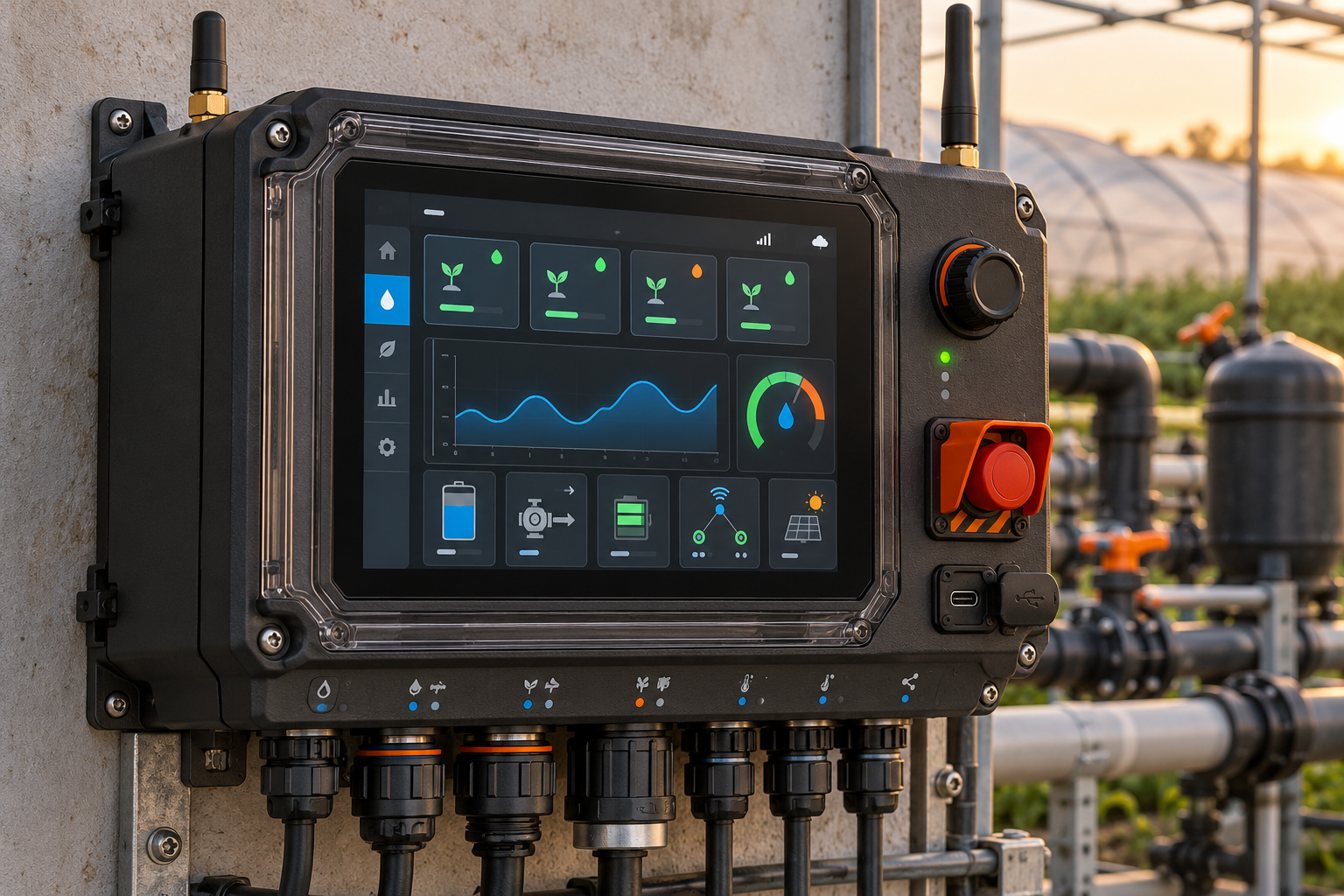
What does JoME do?
An irrigation system has physical valves and pumps. JoME gives them a more useful vocabulary: zones such as vegetable beds, fruit trees, or a lawn, and programs that water those zones in sequence on selected days.
The controller runs the programs itself. A phone is useful for setup and control, but it does not have to stay awake to trigger every watering step. A rain delay pauses scheduled watering, and manual controls let the user start or stop a zone.
The current implementation also reads board temperature and a flow sensor. Flow measurements make it possible to record litres used during a watering run, rather than keeping only a timer. More advanced responses to sensor readings, weather, and soil conditions are part of the work ahead.
The parts of the project
JoME is split across a few repositories with distinct responsibilities:
| Part | Role | Implementation |
|---|---|---|
| JoME app | Setup, zone control, schedules, device status, terminal, and assistant UI | React, TypeScript, Vite, Capacitor |
| SHamBE | Firmware that operates the irrigation hardware | C++, ESP32, FreeRTOS, PlatformIO |
| DouSHamBE | Accounts, device ownership, remote commands, and a cloud copy of device state | Python, FastAPI, MongoDB, Redis, RabbitMQ |
| Board protocol | Shared contract between the app, firmware, and server | JSON commands, responses, and events |
| Landing page | Public introduction to the project and its direction | Next.js |
There is also MQute, a separate Python MQTT framework experiment. The current DouSHamBE implementation uses its own messaging services with aiomqtt and aio-pika.
The intended connection paths look like this:
JoME app ── Bluetooth / USB ──► SHamBE controller ──► valves and pumps
    │                                │
    └── HTTPS / event stream ──► DouSHamBE ◄── MQTT over TLS ──┘
The local Bluetooth and USB path is implemented. The app and backend have cloud-side components, while the controller’s registration and MQTT connection remain integration work.
The mobile app
I’m using React 19 and TypeScript, packaged for Android and iOS with Capacitor 8. The same application also runs in the browser, which makes it useful for development and testing alongside the phone builds.
The main screens cover the everyday tasks:
- Home: controller status, the next watering program, quick actions, and water usage.
- Zones: named watering areas, their valve mappings, and manual run controls.
- Schedule: weekly programs containing a sequence of zones and durations.
- Device: connection details, settings, and access to the diagnostic terminal.
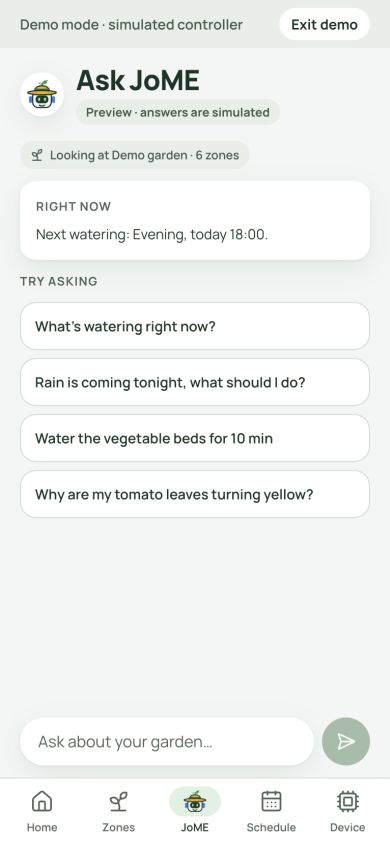
- Ask JoME: the assistant interface, currently backed by a scripted preview.
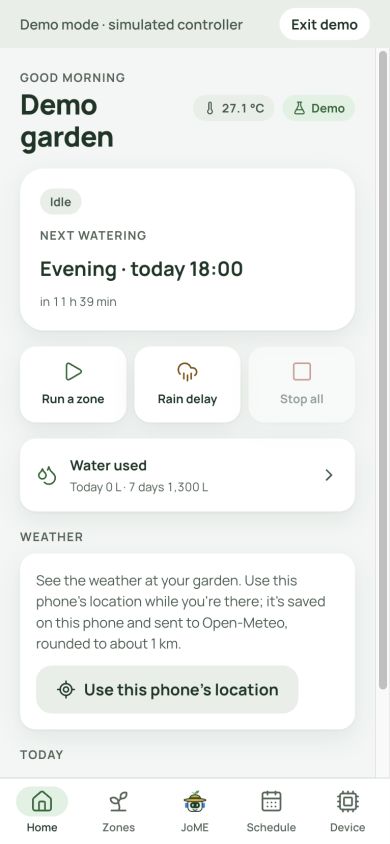
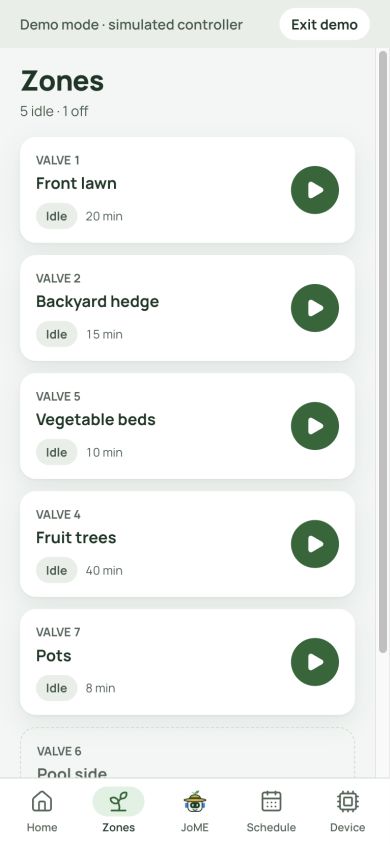
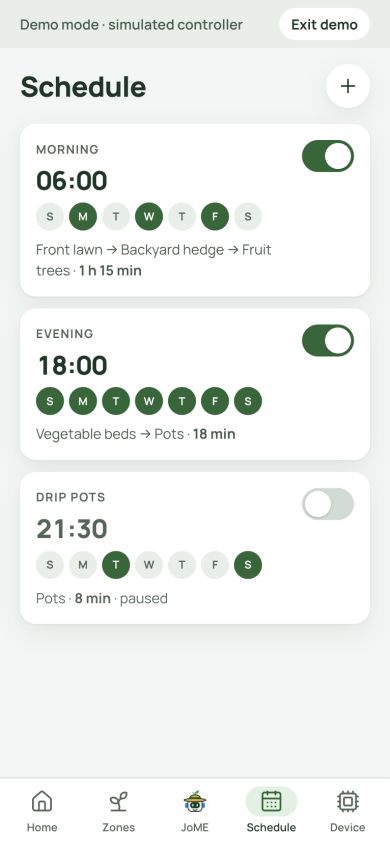
These are screenshots of the running web app at a phone-sized viewport, using its simulated controller. The garden names, readings, and programs are demo data.
One device client, several connections
The app talks to a DeviceClient that sends requests and matches responses by their IDs. Beneath it, a small Link interface handles bytes. Bluetooth, USB, the demo controller, and the cloud adapter implement that same interface, so zone and schedule screens can share the command path.
Bluetooth is available through the native phone integration and Web Bluetooth in supported desktop browsers. USB uses Web Serial on desktop and a native USB serial bridge on Android. iOS uses Bluetooth for local access.
Shared application state lives in Redux Toolkit: account state, connection state, and one garden snapshot used by the screens. A disconnected board should not leave the app pretending that an old snapshot is live.
Inside the controller
The current firmware runs on an ESP32 development board. A PCF8575 I²C expander provides up to 16 relay channels for valves and pumps. The prototype also includes an SSD1306 OLED, an LM35 temperature sensor, and a YF-B6 flow sensor. A SIM900 modem has been brought up for boot-time SMS notifications; full cellular connectivity is still future work.
The firmware separates hardware drivers from irrigation logic. The application works with interfaces for relays, storage, displays, and sensors; the ESP32-specific drivers sit underneath. This lets me test irrigation decisions on a computer and gives a future custom board a clear place to connect.
Watering and safety
The irrigation core models valves and pumps and checks that a pump has an associated open valve before starting it. The scheduler stores programs on the controller, runs their steps, respects rain delay, and includes logic for resuming a program after a restart. The clock can synchronize through NTP when Wi-Fi is connected.
Configuration uses NVS and LittleFS. File updates use a temporary file followed by a rename, and persistence failures must be reported rather than acknowledged as successful saves. Flow pulses are converted using a calibration factor, and each zone run’s litres and duration go into a 90-day usage log.
There are native tests for the portable logic and a separate on-device test tier for drivers, storage, and task behavior. Passing desktop tests is one part of validation; wiring, calibration, and recovery still need checks on real hardware.
A shared command language
The protocol repository defines commands such as zone.run, program.save, and sensors.read. Over Bluetooth and USB, requests and responses are newline-delimited JSON. The hello response advertises the commands a board supports, so clients can check capabilities before calling them.
For example, a local request to run zone 1 for ten minutes is:
{"id":1,"cmd":"zone.run","args":{"zone":1,"seconds":600}}
The contract also defines the future MQTT transport. Keeping one command vocabulary across connections helps prevent the phone app and remote-control service from developing different meanings for the same action.
The backend and remote access
DouSHamBE provides the server side of device registration, ownership, sharing, and remote access. It uses FastAPI for HTTP endpoints, MongoDB for persistent records, Redis for coordination, and RabbitMQ for messaging and the device broker path. The app currently offers Google sign-in.
The backend maintains a cloud copy of device state. The controller remains the authority for what is actually running; an offline snapshot needs an age and an offline indication, so it cannot be mistaken for a fresh reading.
The registration design uses a short-lived user token passed locally to the board. The board is intended to generate its own key pair, request a client certificate over HTTPS, and connect to the broker with mutual TLS. Server-side support is implemented, but the corresponding firmware path is still planned. I’m treating end-to-end remote control as unfinished until those pieces work together on hardware.
Where the AI assistant stands
The assistant UI and its device-action boundary are implemented. Read operations can inspect the controller, stop operations can close water immediately, and actions that start watering or change a program require the user to tap Confirm.
The current assistant is a scripted preview. It exercises the chat flow and action cards using controller data. Connecting a real agriculture model and external knowledge sources is future work; the preview does not demonstrate trained-model performance, plant diagnosis, or weather-driven automation.
Where I am now
I’m at the prototype and integration stage, ahead of the original design-only milestone but still working toward a complete release.
| Area | Current stage |
|---|---|
| Local controller | BLE/USB commands, zone control, on-board schedules, OLED status, temperature, flow readings, and usage logging implemented |
| App | Core screens, demo mode, local links, cloud adapter, Google sign-in, and Android/iOS project setup implemented |
| Backend | Account and device services, state mirroring, messaging, certificate services, and deployment automation implemented |
| End-to-end cloud connection | Board registration and MQTT firmware integration still pending |
| AI | Assistant UI and confirmation rules implemented; real agent integration pending |
| Custom hardware | Concept stage; firmware currently targets the development-board setup |
My next priorities are completing the board-to-server path, validating the whole system on real hardware, and finishing release checks for the mobile builds. More advanced sensing, plant advice, and nutrient delivery belong to the longer-term direction.
I want the foundation to be dependable: the controller follows a schedule, the app shows its actual state, and a failed connection or failed save is visible. That is the base the more ambitious parts of JoME will build on.
Follow the project
- JoME landing page
- Try the JoME web app — choose Try the demo to explore without hardware.
- JoME on GitHub — app, firmware, backend, protocol, and related work.
Comments are hosted by commentbox.io and only load when you ask for them.