1. Intro
Hello there, this is Ali speaking. When I started studying computer engineering at Shiraz University, CSE101 was the introductory course we had to take to get familiar with basic programming concepts. That’s where I was introduced to the Python programming language for the first time. Python is a very cool language with practical uses in almost every field: data science, machine learning, web development, game development, and more.

Now I use Python almost every day of my academic career, so it was an excellent choice to begin with. It wasn’t my first language, though. In my first year of high school I learned C, which I used to solve math problems, just for fun. I had no source to learn from except our computer teacher and an ancient book based on Borland C++ running on MS-DOS. We didn’t have internet access at home or at school back then, so the only way to learn was reading books and asking questions. So CSE101 was the most straightforward course of my life. I never studied the syllabus; I just learned everything about Python I could find on the internet. The course’s final project was “Making a Very Simple Snake Game” (like the old-school Nokia game), without advanced libraries or frameworks such as PyGame.
In this article we implement that Very Simple Snake Game. The full source is on GitHub. It’s the actual code I handed in back then (Fall 2015), uploaded in 2020, bugs and all.
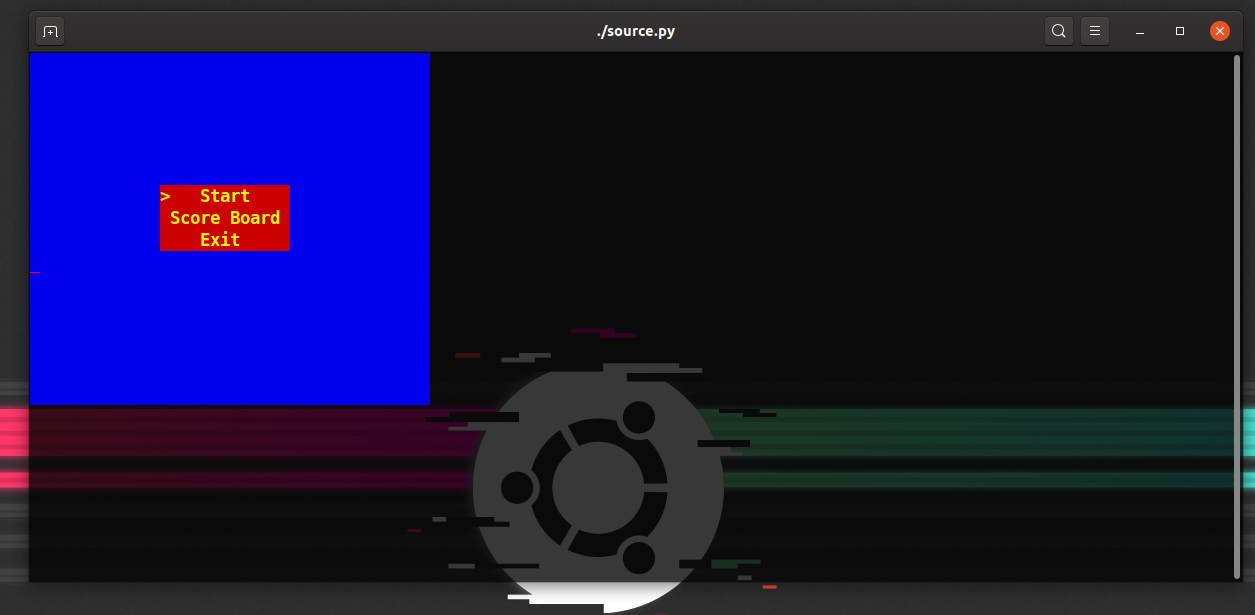
The main menu, drawn entirely with colored characters in a terminal.
Table Of Contents
- 1. Intro
- 2. Problem Statement
- 3. Challenges of The Project
- 4. Solution and Design
- 5. Implementation
- 6. Final words
2. Problem Statement
Develop a straightforward snake game like the one on old-school Nokia phones. A single snake moves around the game world. You control the snake using the arrow keys or W, A, S and D to move UP, LEFT, DOWN and RIGHT. At random times, an apple (food) appears on a random spot of the map. If the snake eats it, its tail grows by one unit and the player gets 100 points. The map can contain walls or obstacles. The player loses if the snake hits a wall or its own tail. Pressing Esc pauses and unpauses the game. The score must be stored after each game.
Note: Any creative ideas that improve performance, game experience or appearance count as bonuses: a menu, several levels, even a storyline.
And the one rule that makes it interesting: no game or GUI libraries. No PyGame, no wxPython. The only thing allowed was colorama, for colors and cursor positioning, and even doing that yourself was a bonus.
3. Challenges of The Project
It sounds like a toy, but three things in it are genuinely hard for a first-semester student:
- Drawing at a position.
print()writes wherever the cursor happens to be, line after line. A game needs to put a character at column 12, row 5, and later erase it. - Non-blocking input.
input()stops the whole program until you press Enter. A snake has to keep moving whether you touch the keyboard or not, and react the moment you do. - Flicker. The obvious approach, clearing the screen and redrawing everything every frame, makes the terminal blink like crazy.
4. Solution and Design
As the game world is the console and no graphics libraries are allowed, everything in the game is just a character. The snake is a row of Os, food is A, and walls are #. The board is a 40×16 blue rectangle.
The code is split into four small modules:
| Module | Job |
|---|---|
display.py |
print a string at (x, y) with a color, background and intensity; draw rectangles; clear the screen |
keyboard_manager.py |
non-blocking keyboard input on Linux, macOS and Windows |
db.py |
save and load name:score lines in a text file |
source.py |
the menu, the game state machine and the main loop |
The game is a state machine. A single variable, g_state, says where we are, and the main loop only does what that state allows:
g_state |
Meaning |
|---|---|
| 0 | main menu |
| 1 | start a new game |
| 2 | score board |
| 3 | exit |
| 4 | game drawn, waiting for the first key |
| 5 | game running |
| 6 | game over |
| 7 | paused |
Looking back, this was the best decision in the project. Pausing, the score board and the menu all became “just another state” instead of special cases scattered around the loop.
Only draw what changed. This is the answer to flicker. The board is drawn once when the game starts. After that, when the snake moves one step, only two cells actually change: the old tail cell becomes empty and the new head cell becomes O. So each frame writes exactly two characters instead of 640.
5. Implementation
5.1 Printing at (x, y)
Terminals understand ANSI escape codes. ESC[y;xH moves the cursor, ESC[31m sets a red foreground, ESC[44m a blue background, and so on. colorama’s init() makes those codes work on Windows too. With that, the whole graphics engine is one function:
def print_XY(msg, x=1, y=1, color='reset', bg_color='reset', intensity='reset'):
    s = '\033[' + str(y) + ';' + str(x) + 'H'            # move the cursor
    s = s + '\033[' + color_map[color] + 'm'              # text color
    s = s + '\033[' + bg_color_map[bg_color] + 'm'        # background
    s = s + '\033[' + intensity_map[intensity] + 'm'      # brightness
    print(s + msg)
A rectangle is print_XY(' ', ...) in a double loop, and moving a character is erasing it at the old spot and printing it at the new one:
def swap(msg, p, s, color="reset", bg_color="reset", intensity="reset"):
    print_XY(" ", p[0], p[1], color, bg_color, intensity)  # erase the old position
    print_XY(msg, s[0], s[1], color, bg_color, intensity)  # draw at the new one
5.2 Non-blocking input
This was the part I understood least at the time. I pieced it together from Stack Overflow answers and changed it until it worked. Today it’s easy to explain.
Your program never talks to the keyboard directly; the operating system does, and by default the terminal is in canonical mode: it echoes what you type and only hands your program the line once you press Enter. That’s exactly what input() wants, and exactly what a game doesn’t.
So on Linux and macOS, KBHit switches the terminal out of canonical mode and turns off echo with termios, and registers an atexit hook to put it back when the game exits. Then select() with a timeout of 0 asks “is there anything to read right now?” without waiting:
def no_echo(self):
    self.__fd = sys.stdin.fileno()
    self.__new_term = termios.tcgetattr(self.__fd)
    self.__old_term = termios.tcgetattr(self.__fd)
    # no line buffering, no echo
    self.__new_term[3] = (self.__new_term[3] & ~termios.ICANON & ~termios.ECHO)
    termios.tcsetattr(self.__fd, termios.TCSAFLUSH, self.__new_term)
    atexit.register(self.set_normal_term)

def kbhit(self):
    dr, dw, de = select([sys.stdin], [], [], 0)
    return dr != []
On Windows, msvcrt.kbhit() and msvcrt.getch() do all of this for you.
Arrow keys had one more surprise. They don’t send one byte; they send three: ESC, [, and a letter (A up, B down, C right, D left). So getch() reads one byte, and if it’s ESC, reads two more and returns the letter:
c = sys.stdin.read(1)
if c == '\x1b':
    return sys.stdin.read(2)[1]
return c
The catch: the Esc key on its own also sends \x1b, and then getch() sits waiting for two bytes that never come. I never solved that in the course, which is why the game pauses with p instead of Esc, and quits with q.
5.3 The snake
The snake is a list of (x, y) points, head first. The direction is a vector:
key_direction_map = {0x01: (0, -1), 0x02: (0, 1), 0x03: (-1, 0), 0x04: (1, 0)}
Moving is adding the direction to the head, putting the new head in front and dropping the last point:
s = snake[0]
s = s[0] + m_dir[0], s[1] + m_dir[1]
p = snake[-1]
snake = [s] + snake[:-1]
display.swap('O', p, s, "red", "blue", "bright")
A few small tricks make it feel like a snake:
- No U-turns. If the new direction is the exact opposite of the current one, the two vectors add up to
(0, 0), and the key is ignored. Otherwise pressing “left” while going right would kill you instantly. - Wrap-around. Leaving the board on one side brings you back on the other, like the Nokia version.
- Growing. When the head lands on food, the last segment is duplicated:
snake = snake + [snake[-1]]. On the next move the tail stays where it is while the head moves on, so the snake is one cell longer. - Losing. You lose when the head is inside the rest of the body (
snake[0] in snake[1:]) or inside a wall.
5.4 Timing and food
The main loop sleeps 1 ms per iteration so it doesn’t burn a CPU core, and checks the keyboard every iteration so input feels instant. But the snake only moves once every 50 iterations (speed_counter_limit). Separating “how often we read input” from “how often the snake moves” is what made it playable.
Food follows the same idea: a countdown set to a random 500–2000 iterations, and when it hits zero a new apple appears, up to three on the board. The spot is picked by listing every cell on the board, removing the ones taken by the snake, walls and other food, and taking random.choice of what’s left. That’s slow (it rebuilds a 640-cell list every time), but it can never place food on the snake.
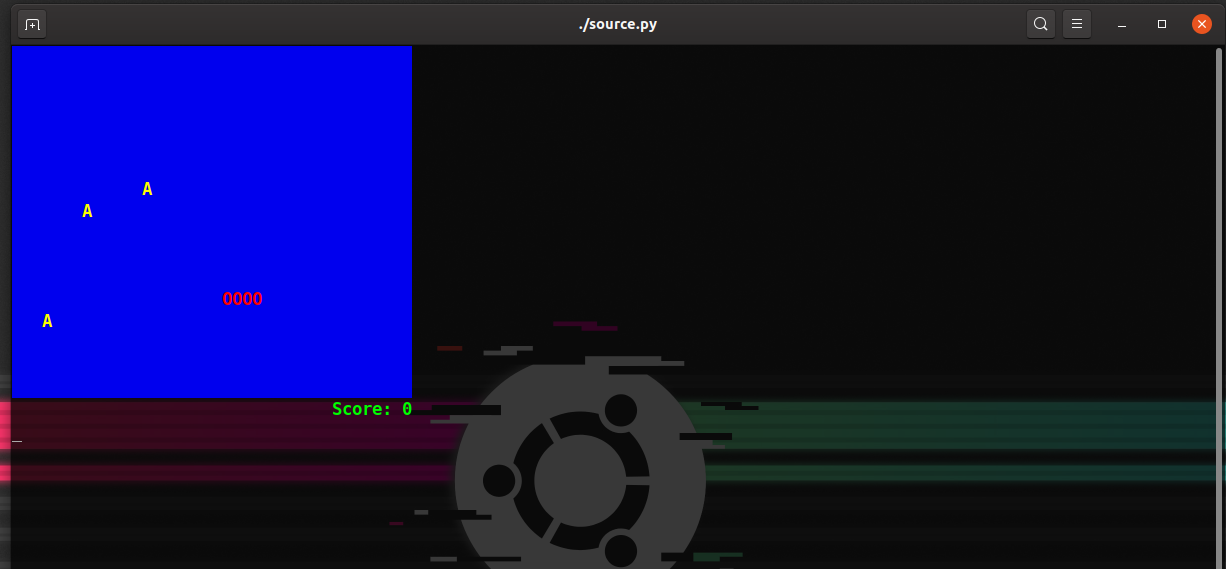
In game: the snake (OOOO), three apples, and the score.
5.5 Saving scores
When the game ends, the terminal goes back to normal mode so input() works again, the game asks for “Your Beautiful name?”, and db.py appends name:score to a text file. The score board reads that file back and prints it with alternating row colors. No database, no JSON, just a text file, which was exactly enough.
6. Final words
Reading this code again years later, I can see everything wrong with it. It’s one big while loop with magic numbers for states. The walls feature exists but the list is always empty. Food gives 50 points instead of the 100 the statement asked for. Esc doesn’t work. Speed depends on how fast your machine runs the loop.
But I can also see why it worked, and why this was such a good first project. In a few hundred lines it forced me to learn things no “hello world” does: how a terminal actually works, what the operating system does with your keystrokes, why a game loop exists, why you redraw only what changed, and how a state machine keeps a program from turning into spaghetti. I use every one of those ideas to this day.
If you’re a student with the same assignment, feel free to read the code, but write your own. Fixing the Esc key is a great place to start.
Comments are hosted by commentbox.io and only load when you ask for them.