Nunya is live now: a free, open-source desktop VPN client for macOS, Windows and Linux. You give it the servers you already have, a single share link, a subscription with hundreds of configs, or a WireGuard file, and it connects you through them. It has no account, no telemetry, and the code is GPL-3.0.
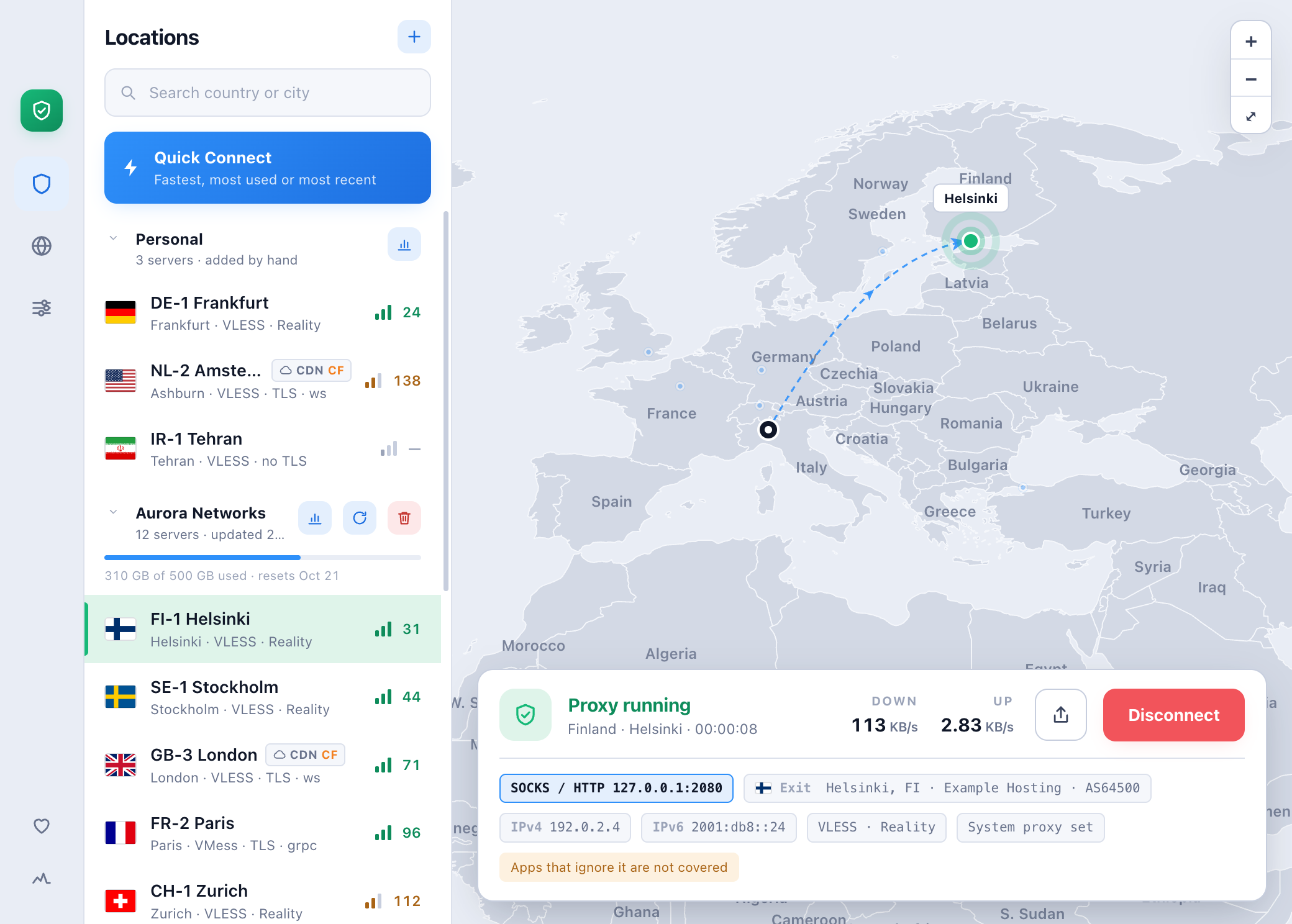
Nunya connected through a server in Helsinki: the server list, the route on the map, and the status card with live traffic. The servers are made-up examples.
This post is about three things: the idea, how the app is put together, and what it took to build it like a professional open-source product rather than a weekend hack. The last part is the one I’m proudest of.
1. The idea
If you live somewhere with a filtered internet, a VPN client is not a nice-to-have; it is how you reach half the web. Most people around me do not buy a “VPN product”. They get VLESS, VMess, Trojan or WireGuard links from a friend or a seller, or a subscription URL from a panel, and paste them into whatever client works this month.
Those clients are powerful, but they have two problems:
- They are built for people who already understand them. Inbounds, outbounds, routing tables, core selection. Great for power users, confusing for everyone else.
- They say more than they know. A green “Connected” usually means a process started, not your traffic is actually getting through. A server labelled “Germany” might exit in the Netherlands, or be fronted by Cloudflare and exit somewhere else entirely.
So Nunya’s promise fits in five words: safe, fast, reliable, secure, easy. Behind all five is one rule: the app never claims more than it can prove.
- A server only counts as working if traffic actually passes through it end to end.
- A server’s flag comes from where its traffic really exits, not from its name. For a Cloudflare-fronted server, Nunya asks Cloudflare which data center your network actually reaches.
- The shield turns red when the tunnel is up but nothing comes out of it.
- In proxy mode, the app tells you exactly which apps are covered and which are not. It only says “protected” when the whole device is in the tunnel.
2. What it does
- Two ways to connect. VPN mode carries the whole machine through a TUN device. Proxy mode opens a local SOCKS/HTTP port and can set it as the system proxy, then puts your original settings back when you disconnect.
- One box for every link. VLESS, VMess, Trojan, WireGuard and Cloudflare WARP; TCP, WebSocket, gRPC, HTTP/2, HTTPUpgrade, QUIC and XHTTP; TLS, Reality, uTLS fingerprints and ALPN. Subscriptions can arrive as link lists or as Xray, sing-box or Clash configs. QR codes work too.
- Quick Connect to the fastest, most used or most recent server.
- Usage history per server and per subscription, next to what your provider reports.
- Sharing a server as a link, a QR code, or a WireGuard config the official apps can scan.
- Ad blocker, anti-tracker and bypass rules while you are connected.
- A menu-bar shield on macOS and Linux that connects and disconnects without opening the window.
- Self-updating, with signed releases and a beta channel.
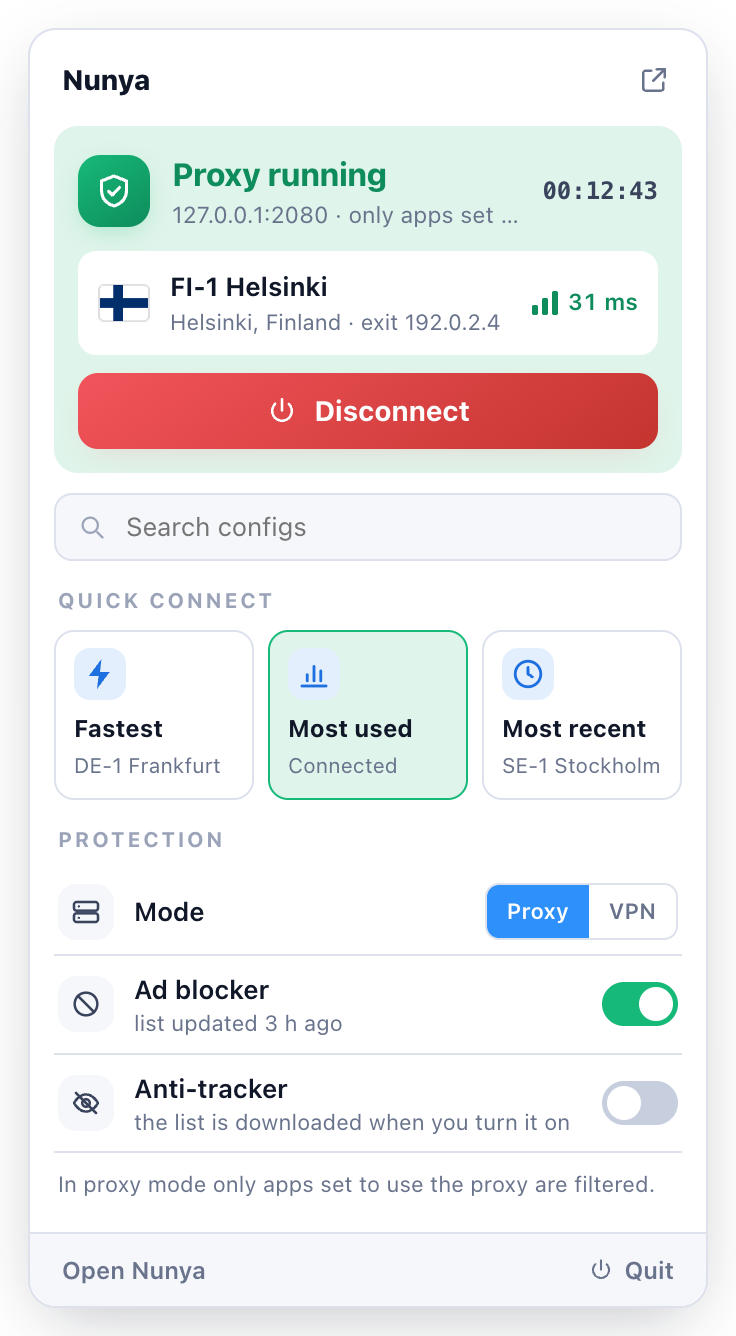
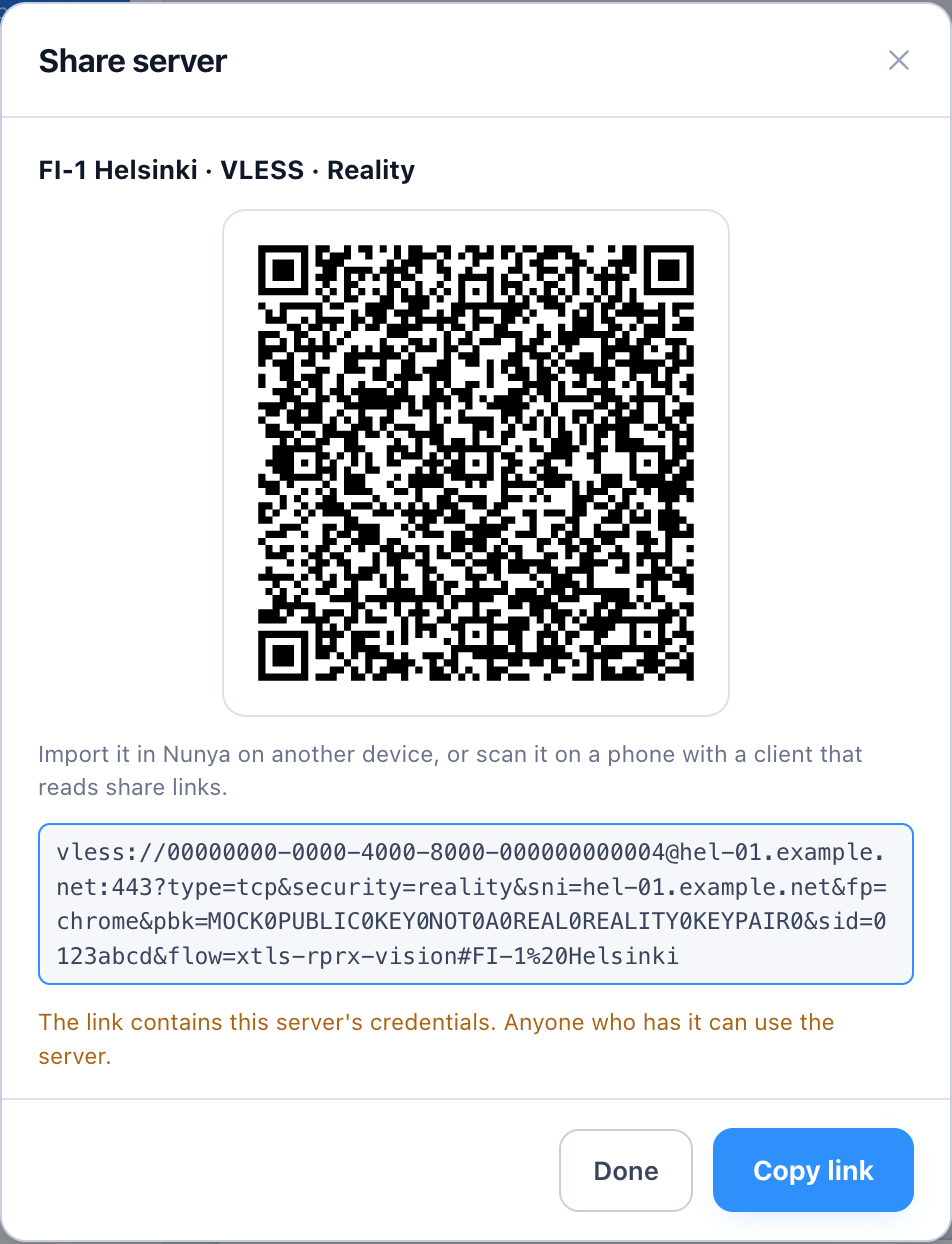
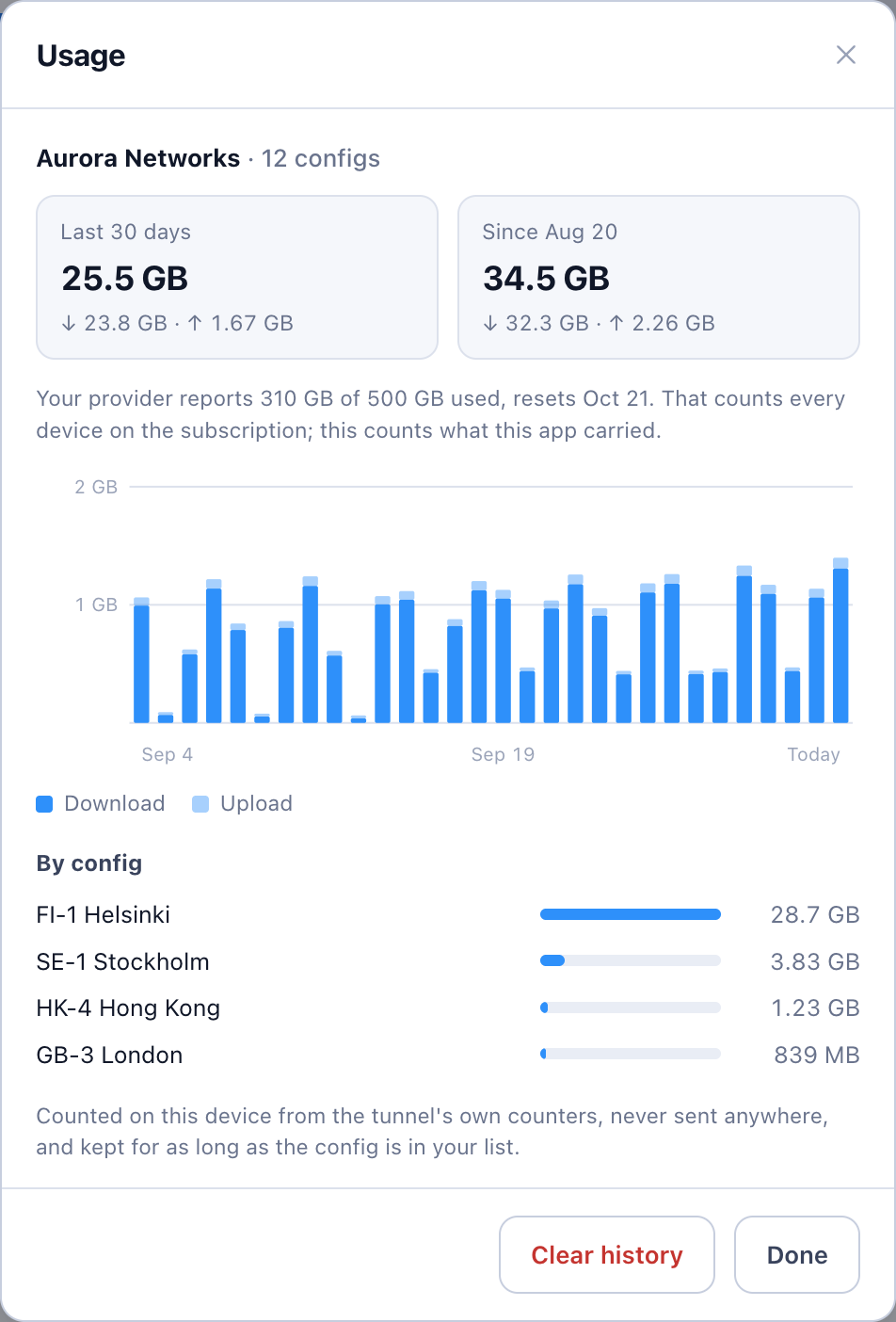
The menu-bar popover, sharing a server, and per-server usage.
3. How it is built
Nunya lives in two public repositories under the nunyavpn organization. Both started as forks of Throne (itself a descendant of NekoRay), and both stay GPL-3.0 like their ancestors.
| Repo | What it is | Stack |
|---|---|---|
| nunya | the app you install | Tauri v2: TypeScript UI, Rust shell, Swift tunnel extension on macOS |
| nunya-core | the network engine | Go, wrapping sing-box and Xray |
3.1 Two repos, one pinned contract
The app never builds the core. It pins a core release in a core.lock file, together with the SHA-256 of that release’s SHA256SUMS. One digest makes the whole set of binaries tamper-evident: if a release is ever re-cut, the fetch script fails instead of installing it.
The interface between the two is a single protobuf file, nunya.proto, which ships as a release asset. Go generates its handlers from it; Rust generates its bindings from the same file. A client pinned to a tag cannot be built against a contract it did not pin.
3.2 An IPC that trusts nobody
Despite the service block in the proto, nothing on the wire is gRPC. It is two tiny little-endian frames over a Unix socket, or a named pipe on Windows:
request   [u32 id][u16 method_len][method][u32 payload_len][protobuf]
response  [u32 id][u8  status    ][u32 payload_len][protobuf or error text]
The interesting part is who trusts whom. The GUI listens and the core dials in, and both ends verify each other. The core checks that the process it is talking to is its own parent, a binary named exactly Nunya sitting next to it. The app checks that the peer on the socket is the child it just spawned. Without that second check, any local process that won the race to the socket could pretend to be the core and report a healthy tunnel that does not exist, which is exactly the kind of lie Nunya exists to avoid.
3.3 No frontend framework, on purpose
The UI is plain TypeScript. The whole “framework” is dom.ts: h, render, qs. State lives in one store, and every mutation goes through store.update(), which persists and notifies in one place, so no view can change state without the rest of the app hearing about it. That is the Redux pattern without Redux.
Why? Because in a VPN client every shipped byte is something a user has to trust. A handful of screens and one list that refreshes do not justify a dependency tree. We considered React and Tailwind, rejected both, and wrote down why, so nobody has to rediscover the reasoning.
3.4 Reject by name, never silently downgrade
This is my favorite rule in the codebase. If a share link uses a transport the core cannot run, Nunya refuses it and says why. The easy thing would be to quietly treat it as TCP; the core would accept the config and you would get a tunnel that comes up and never passes a single packet.
Same with subscriptions. A panel might serve a list of links, or a whole Xray, sing-box or Clash config, and no HTTP header tells you which. Nunya reads each format with its own reader, but they all feed one writer that turns a server into a share link, so the three formats of the same subscription import the same servers. There is a test for exactly that, and it held against a real panel.
3.5 VPN mode on macOS before a signed NetworkExtension
The proper way to do VPN on macOS is a NetworkExtension, the same thing WireGuard and Tailscale use. That needs a paid Apple Developer account to sign. Until then, Nunya gets VPN mode through a setuid-root core: one administrator prompt, then chown root:wheel and chmod 4755 on the bundled core. Two details matter:
- The app explains the password prompt before macOS shows it. An unexplained password dialog from a VPN app reads as an attack.
- Only a core sitting next to
Nunyais ever granted root, and release builds refuse to bundle a core with the parent check turned off. A root-capable binary that anything local could drive would be a gift to malware.
4. Building it like a real open-source project
The part of this project I enjoyed most was not a feature. It was treating a one-person project as if a team would inherit it tomorrow.
Every merge to main is a release. A feat: PR title bumps the minor version, anything else bumps the patch. CI computes the version, builds for macOS, Windows and Linux, publishes a beta with checksums, and commits the version back. Stable versions are a tag a person pushes. Nobody bumps a version by hand, ever.
Issue -> branch -> PR, even alone. Every change starts as an issue, lands as a squash-merged PR with a conventional title, and the PR title is the changelog.
Comments explain why, not what. Every module opens with a short header: the decision, and the alternative that was rejected. It is the codebase’s defining habit, and it makes reviewing and returning to the code far easier.
Tests are sentences. the_tunnel_takes_the_default_route_and_gives_it_back. There are around 200 Rust tests plus frontend tests, and the important ones run against a real core: every transport the app can emit is fed to an actual nunya-core to prove it is accepted, because the shapes differ in ways a unit test cannot see. The Linux tunnel tests run in a container with CAP_NET_ADMIN, so they need no root on the host.
Docs for two audiences. The website and README are for users: what it does, how to install it, and how to check a download. CONTRIBUTING.md and ENGINEERING_STANDARDS.md are for developers: how to build, how to release, where to split a module when it grows, and which proposals were already rejected.
Refactor before it hurts. Once main.ts got big, I split it along its real responsibilities: tunnel, add-servers, throughput, and each sheet. Each PR was reviewable on its own, instead of becoming one heroic rewrite.
Security is in the defaults. The data file holding your server credentials is written like a key file: owner-only, replaced atomically, and a corrupt file is an error, never a silent reset. Subscriptions are fetched in Rust, not in the webview, because a subscription URL is a credential and should not sit in a browser network log. http:// subscriptions are refused before any request is made.
5. Where it is going
Nunya is live at nunya-vpn.com and already my daily driver. Next up:
- More protocols: Shadowsocks, Hysteria2, TUIC, SSH, AmneziaWG, and proxy chains.
- VPN mode out of the box on every platform, with no administrator step, which on macOS means a signed NetworkExtension.
- Creating Cloudflare WARP configs from inside the app.
- The server side: nunya-server-core (Docker), nunya-cluster and a nunya-server-panel for config and user management.
6. Try it, break it, contribute
Start at nunya-vpn.com. Builds for macOS, Windows and Linux are on the Releases page, each with a SHA256SUMS to check your download against. Bug reports, ideas and pull requests are welcome in the issues. If you have ever pressed “Connect” and wondered whether it actually did anything, this app is for you.
Comments are hosted by commentbox.io and only load when you ask for them.