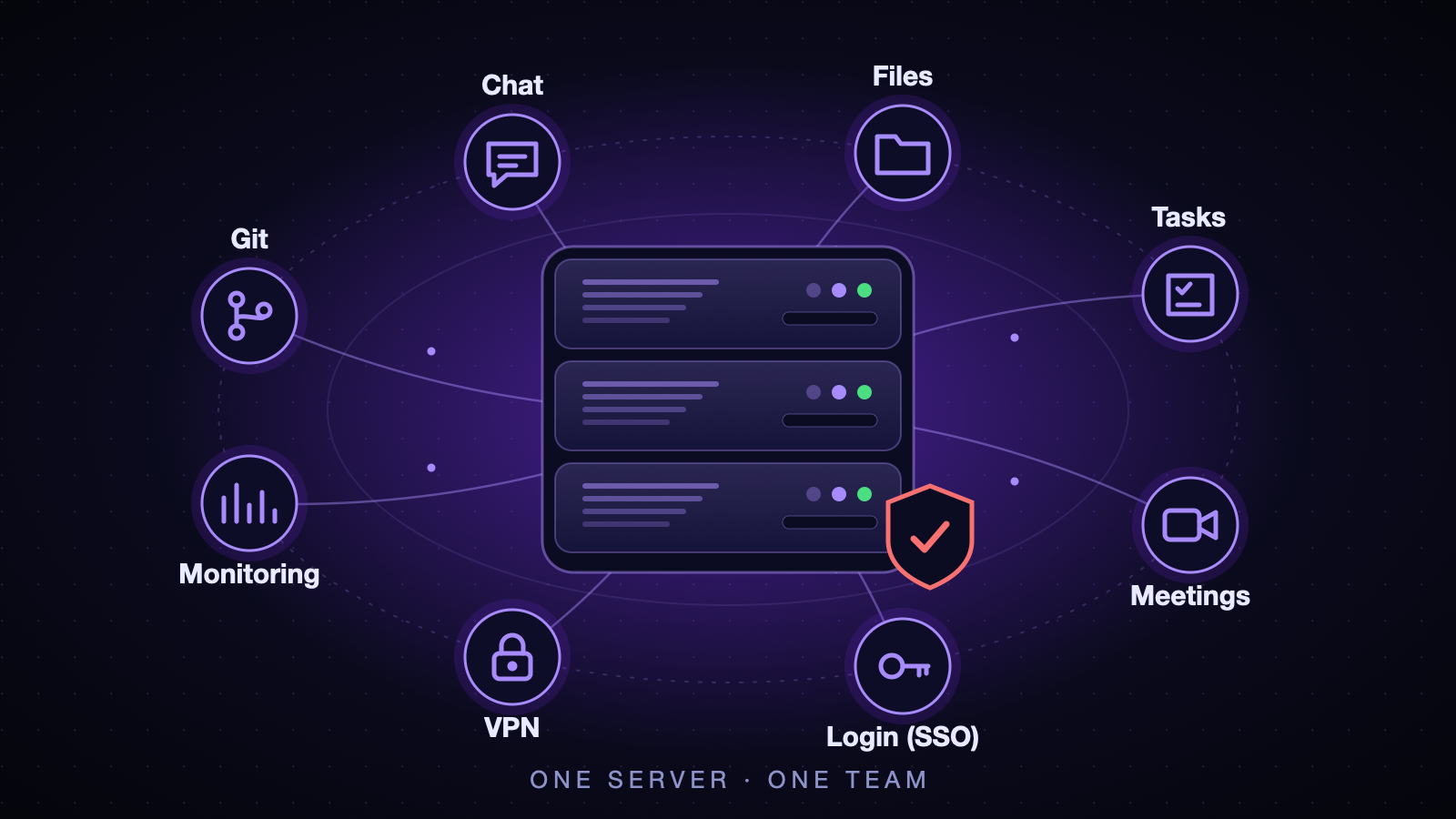
When we started the company, we needed what every software team needs on day one: a place for the code, a way to talk, somewhere to put files, a task board, video meetings, a way to reach internal tools safely, and a way to see what is going on. We could have bought a stack of SaaS subscriptions. Instead we rented one dedicated server in a datacenter, and I built all of it myself.
I am the co-founder and CTO, and for a long time I was also the whole operations team. This post is the honest version of that experience: how the thing is designed, which services run on it and how they are deployed, the mistakes I made, and what I would tell someone about to do the same. I will stay at the architecture level on purpose; a post about security should not be a map for attackers.
1. Why one server
The reasons were boring and practical:
- Cost and control. One machine with a lot of disk and RAM is cheaper than a dozen subscriptions, and our data stays where we put it.
- A small team. There was no operations department. Whatever I built had to be something one person could understand, operate and fix at 3 a.m.
- Learning. Running the whole stack yourself teaches you things no managed service will.
The price is also real: a single server is a single point of failure, and every outage is your outage. Much of what follows is about making that tolerable.
2. The foundation: virtualization and snapshots
The server runs Proxmox VE. It lets me split one big machine into many small ones, and it gives me the feature I use more than any other: snapshots.
- Containers (LXC) for the services we run ourselves. They are light, start in seconds, and one service (or one small stack) per container keeps the blast radius small.
- Virtual machines for things that need their own kernel or belong to a person: databases, object storage, a CI runner, and machines our teammates use for their own work.
- Storage tiers. Fast SSD storage for things that need speed, a big spinning-disk pool for bulk data and backups.
My rule from day one: take a snapshot before you touch anything. Upgrades, migrations, config changes, all of it. More than once that single habit turned a bad evening into a two-minute rollback.
3. The network: two worlds and one door
The most important design decision was the network. The server has a handful of public addresses, and teammates sometimes need their own machines with their own public address. Internal services (databases, admin panels, monitoring) must never be reachable from those machines or from the internet.
So the network has two zones, and a small number of doors between them:
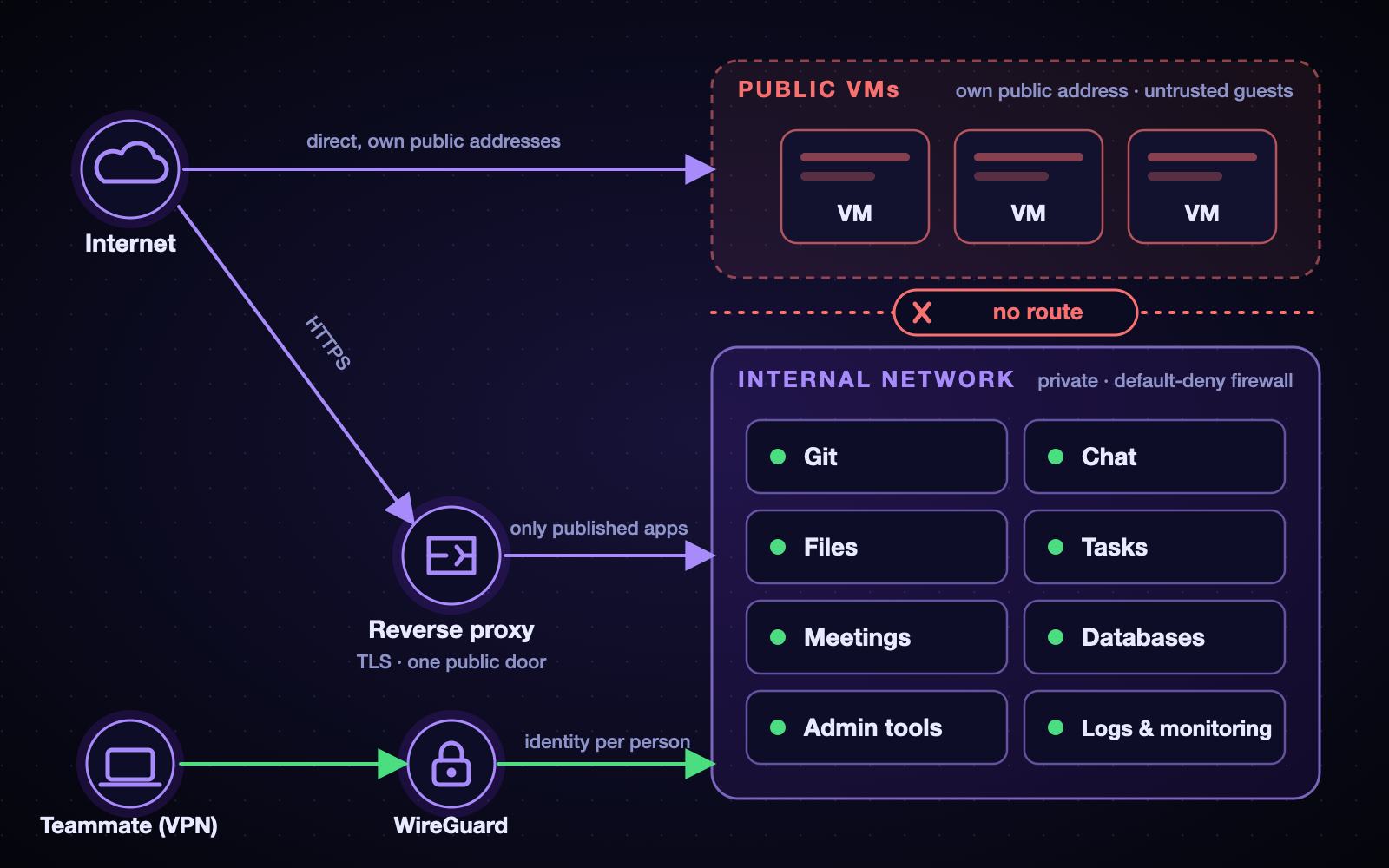
The two zones. Public VMs live in their own isolated zone, the internal network is reachable only through the reverse proxy (published apps) or the VPN (people), and the public VMs have no route into it.
- Internal network. Everything private lives here. It reaches the internet through the server, but nothing from outside can reach it directly.
- Public bridge. Machines that need their own public address live here, and the firewall treats them as untrusted guests: they cannot see the internal network or the host.
- One door in: WireGuard. To reach internal tools from home, you connect to the VPN. Each person has their own identity on it.
- One reverse proxy in front of everything that is meant to be public. It terminates TLS and routes by name. Nothing else is exposed.
- A default-deny firewall, with every opening an explicit, documented decision.
- Anti-spoofing for public machines: datacenters bind addresses to machines, so each public VM is only allowed to send traffic with the identity it was given. That protects the neighbors and us.
The first week of this project was not building; it was auditing what I had made. I found places where internal and public traffic were more mixed than I believed. Fixing that early was far cheaper than fixing it after people depended on it.
4. The services
Here is what runs on it, and what each replaced:
| Need | What we run | Notes |
|---|---|---|
| Code hosting, CI, packages | Gitea + a CI runner | Lightweight, fast, our repositories stay with us |
| Team chat | Mattermost | Channels, threads, integrations |
| Files and calendar | Nextcloud | Shared files, office documents |
| Tasks and projects | Plane | The board the engineering team lives in |
| Video meetings | Jitsi Meet | Self-hosted calls with login required to host |
| Reverse proxy and TLS | Nginx Proxy Manager | Let’s Encrypt certificates for public names |
| Identity | authentik | One account, one login, for everything |
| Databases and storage | PostgreSQL, MongoDB, MinIO | On their own machines, internal only |
| Monitoring and logs | Grafana, Prometheus, Loki | Dashboards, metrics, and months of logs |
| Private access | WireGuard (with a small web UI) | One identity per person |
5. How it is deployed
Nothing fancy, and that is deliberate.
- Docker Compose inside a container for each service or small stack. One folder, one compose file, one place to look.
- Configuration in files, secrets outside git. Passwords and keys live in environment files on the machine, never in a repository. Repos hold structure, not secrets.
- Pinned versions. I never let a service follow
latest. Upgrades are an explicit action I take after a snapshot, not something that happens to me. - Declarative where it pays off. The identity provider is configured through blueprints (YAML in git), so the whole login setup can be reviewed and reproduced instead of clicked together.
- Generated dashboards and alerts. The monitoring dashboards and alert rules are produced by small scripts and committed, so the same dashboards can be rebuilt on a new server.
- Documentation as code. A private repository holds the architecture, an inventory, a runbook, a change log with how to undo every change, and a to-do list kept as issues with labels. More on this below.
One lesson about upgrades: do them one major version at a time, with the tags pinned, and test between steps. Skipping versions on a stateful app is how you learn about migrations the hard way.
6. One login for everything
Early on, every service had its own accounts and passwords. That is a mess for a team: onboarding means six accounts, offboarding means six places to forget one.
So I deployed authentik as the single identity provider and connected every service to it with OpenID Connect:
- Invitation-only registration. Nobody can sign themselves up; an admin sends an invite.
- Groups decide roles. An
adminsgroup makes someone an admin in the services that support it; adevgroup controls who even sees the code-hosting app. - Services without native SSO (the video meetings, some admin tools) get a small adapter or sit behind an authentication gate in front of them.
- Multi-factor authentication is mandatory for admins. If you are an admin and have no second factor, you are sent to set one up at your next login.
- Local break-glass logins stay. If the identity provider is down, I can still get in. A single point of failure for authentication needs an escape hatch.
The unglamorous part was migrating existing accounts: people already had a chat account, a file account, a git account. Linking each of them to the new identity without losing their history took more care than the SSO itself.
7. Seeing everything: logs, dashboards, alerts
At first, monitoring was an afterthought. I now think it should come right after the network.
- Six months of logs. Firewall events, connection attempts, and access logs go to a log store and stay for half a year. When someone asks “who connected to what, and when?”, I can answer.
- Per-person VPN logs. VPN connections are logged under the account holder’s name, so an incident can be traced to a person and a device rather than “someone on the VPN”. We are open with the team about this.
- Dashboards that answer questions. Traffic per machine (up and down, especially to and from the internet), resource use per machine (CPU, RAM, disk, network), a security view (login attempts, scans, blocked spoofing) and an “internal network and VPN” view of who used what.
- Alerts that explain themselves. An alert that only says “something is wrong” is not enough at 3 a.m. Mine say what happened, name the root (the attacker’s address, the machine, the container), say what to check first, and what to do next.
The paragraph I would rather not write, but should: before this monitoring existed, one of the machines we hosted for a teammate was compromised and used to mine cryptocurrency. We found out the hard way, and because there were no logs from that time, we could not tell how it started. That single incident justified every hour I later spent on logging. Visibility is not a luxury you add later; the day you need it is the day it is too late to have it.
8. Documentation is part of the system
A one-person infrastructure has a bus factor of one, and that person is tired. So I write everything down, in a private repository:
- Architecture, with diagrams, and an inventory of what runs where.
- A runbook: how to do the common things, and how to recover when they go wrong.
- A change log where every change records what, why, and how to undo it.
- Issues for everything not done yet, with labels so I can see by topic what is open.
Writing the “how to undo” line forces me to think about rollback before I need it. It has saved me several times.
9. Mistakes I made (so you do not have to)
- I locked myself out. I tightened an access rule without keeping a second way in. Now every risky network change has two independent paths in and an automatic rollback timer armed before I start.
- I broke the internet for the internal network by turning on a firewall feature that changes how the bridge behaves. It was fixed by a prepared rollback, and the lesson went into the runbook: test the real path (internal to internet), not only the inbound one.
- I took the dashboards down with a config typo. A single invalid field in an alert definition made the monitoring service refuse to start and restart in a loop. Now alert changes go through a script that checks the service is healthy afterwards and restores the last good file if not. I also learned to validate alerts through the tool’s own API, not only by testing the underlying query.
- I over-reserved storage. Every virtual disk was allocated in full up front, so the server looked “almost full” while most of the space was reserved but unused. Thin provisioning and a retention policy for backups are on the list.
- I trusted defaults. A reverse-proxy default, a DNS default, a “latest” tag. Each one cost me an evening.
None of these were catastrophic, because of snapshots, backups, and the habit of writing the undo step first.
10. What I would do differently
- Infrastructure as code from the start. I documented a lot, but I would now provision with a tool like Ansible so the whole server could be rebuilt from a repository.
- Test restores, not just backups. A backup you have never restored is a hope, not a backup.
- Monitoring and logging first. Before any service goes live.
- A second machine somewhere else. One server is great until it is not.
- Notifications. Alerts you only see when you open a dashboard are half of what you need.
11. Takeaways
- Design the network before the services. Zones, one door in, default deny.
- Snapshot before every change, and write the undo step first.
- One identity for everything, with mandatory MFA for admins and a break-glass path.
- Log early, keep it long, and make alerts explain themselves.
- Write it down. The person you are protecting is future you.
- Boring technology wins. Compose files and plain configuration beat clever setups when you are the only operator.
- Be honest about incidents. Each mistake above taught me something that made the system safer.
Building and running this has been the best engineering education I could ask for, and it keeps paying back: every new teammate gets one login, one VPN, and a place to work on day one. If you are a founder weighing a rented server against a pile of subscriptions, the real question is not the monthly price. It is whether you are willing to be the person who answers when it breaks. I was, and I would do it again.
Comments are hosted by commentbox.io and only load when you ask for them.