The router that your ISP or a vendor gives you is a closed box. You cannot see inside it, you cannot fix it, and you cannot make it do what you need. OpenWrt removes that limit. This post covers what OpenWrt is, what Passwall is, how they differ, and what happened when I ran the same setup on two very different routers.
1. What is OpenWrt
OpenWrt is a free Linux distribution for routers. It replaces the vendor firmware with a small, real Linux system: a package manager (opkg/apk), a firewall (nftables), a config system (UCI), and a web interface (LuCI).
What you get:
- Control. Every service, every firewall rule, every radio setting is yours.
- Packages. WireGuard, adblocking, SQM, VLANs, monitoring. Install what you need, nothing else.
- Updates. Vendors drop support after a few years. OpenWrt does not.
- Freedom. The source is open. You can read it, change it, and trust it more than a blob.
2. What is Passwall
OpenWrt is the operating system. Passwall is a package that runs on it.
Passwall (luci-app-passwall) is a LuCI app for proxy routing. It wraps proxy cores such as Xray, V2Ray, sing-box and Hysteria, and lets the router decide, per destination, what goes through a proxy node and what goes direct. You configure nodes, rule lists (geosite/geoip), DNS handling and a transparent proxy mode. Every device on the network gets it without installing anything.
3. The difference
| OpenWrt | Passwall | |
|---|---|---|
| What it is | Router operating system | An app installed on OpenWrt |
| Scope | Everything: network, Wi-Fi, firewall, DNS, DHCP | Only proxy routing |
| Works without the other | Yes | No, it needs OpenWrt |
| Cost to the router | Light | Heavy: crypto, packet marking, DNS splitting |
The last row matters. OpenWrt on its own barely loads the CPU. Passwall pushes traffic through a userspace proxy core, so the router CPU does real work on every packet. That is why hardware matters, and why I tested two routers.
4. The hardware
| Google WiFi (Gale, AC-1304) | Linksys MX5300 (Velop) | |
|---|---|---|
| SoC | Qualcomm IPQ4019, 4x Cortex-A7 | Qualcomm IPQ8072A, 4x Cortex-A53 |
| RAM | 512 MB | 1 GB |
| Wi-Fi | Wi-Fi 5, 2x2 dual band | Wi-Fi 6, tri-band |
| Ports | 2x GbE | 4x GbE + 2.5G-class uplink options (verify on your unit) |
| OpenWrt version | 25.12.5 (r33051) | 25.12.5 |
5. The test
I did not want a VPS, Cloudflare or my ISP in the measurement, so I built the test around the router alone:
- A local Xray server on a laptop on the router’s WAN side, with an iperf3 server behind it.
- A second cable from the same laptop into the router’s LAN, as the client. Traffic goes laptop, router (transparent Passwall2), Xray server, iperf3.
iperf3 -P 8for 20 seconds, both directions, three repetitions, median. Router CPU is read per core from/proc/statduring each run.- Same OpenWrt release (25.12.5), same Passwall2, same server, same settings on both routers. Only the router changes.
The scripts are in the wrtforge repo under bench/.
One limit I must state: my laptop’s wired adapter is 100 Mbps. Any result near 94 Mbps means “the adapter ended the test”, not “the router has more to give”.
6. Results
Google WiFi (Gale), IPQ4019, 4x Cortex-A7, 512 MB
| Tunnel | Down | Up | Busiest core (down / up) |
|---|---|---|---|
| VLESS over TCP, no encryption | 94 Mbps | 94 Mbps | 30% / 88% |
| VLESS with TLS | 41 Mbps | 42 Mbps | 96% / 96% |
| Shadowsocks, AES-128-GCM | 45 Mbps | 44 Mbps | 93% / 93% |
| Shadowsocks, ChaCha20-Poly1305 | 94 Mbps | 94 Mbps | 57% / 87% |
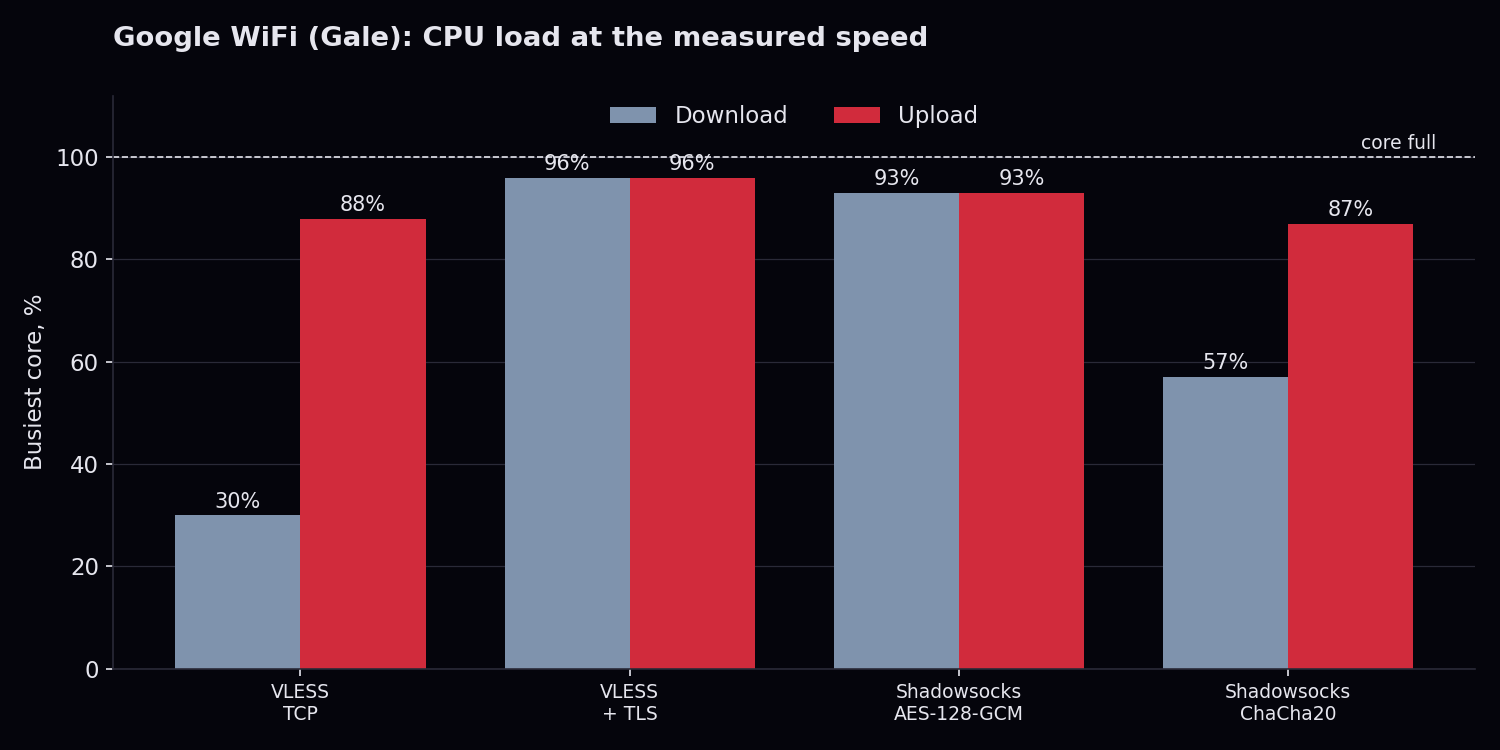
The busiest core during each test. TLS and AES leave nothing; the other two still had room on download.
Estimate for a gigabit port (not measured)
Two rows above stopped at my 100 Mbps adapter while the Gale still had CPU left. To guess where they would end with a gigabit cable, I scaled each measured speed by the CPU left on the busiest core:
estimate = measured speed x 95 / busiest-core CPU %
I used 95, not 100, because the last few percent of a core is never usable. This is a straight-line guess, not a measurement, and real routers lose a little more to interrupts and memory as load rises. Treat it as the order of magnitude. I applied the same formula to all four tests, so the two that were already CPU-bound barely move.
| Tunnel | Down measured | Down estimate | Up measured | Up estimate |
|---|---|---|---|---|
| VLESS over TCP, no encryption | 94 Mbps | about 300 Mbps | 94 Mbps | about 100 Mbps |
| VLESS with TLS | 41 Mbps | about 41 Mbps | 42 Mbps | about 42 Mbps |
| Shadowsocks, AES-128-GCM | 45 Mbps | about 46 Mbps | 44 Mbps | about 45 Mbps |
| Shadowsocks, ChaCha20-Poly1305 | 94 Mbps | about 160 Mbps | 94 Mbps | about 100 Mbps |
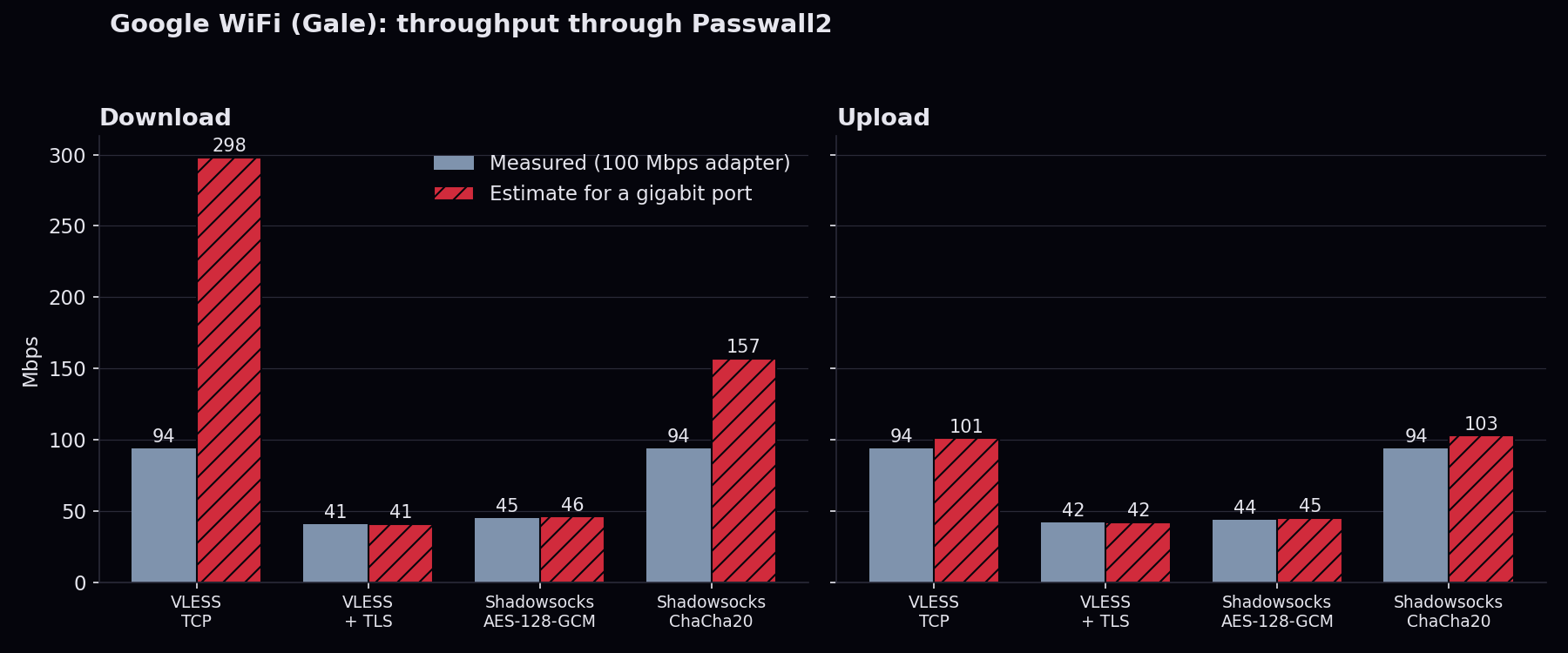
Solid bars are measured. Hatched bars are the estimate. Only the two tunnels that were not CPU-bound move.
Upload is the weak direction: it already used 87 to 88% of a core at 94 Mbps on the two uncapped rows, so it has almost no headroom, and I would not promise more than about 100 Mbps there.
Linksys MX5300, IPQ8072A, 4x Cortex-A53, 1 GB
Same test, same adapter limit, so every row ended at the cable. The useful number is how much CPU it took.
| Tunnel | Down | Up | Busiest core (down / up) | Down estimate for gigabit |
|---|---|---|---|---|
| VLESS over TCP, no encryption | 94 Mbps | 94 Mbps | 55% / 11% | about 160 Mbps |
| VLESS with TLS | 94 Mbps | 94 Mbps | 47% / 14% | about 190 Mbps |
| Shadowsocks, AES-128-GCM | 94 Mbps | 93 Mbps | 47% / 14% | about 190 Mbps |
| Shadowsocks, ChaCha20-Poly1305 | 94 Mbps | 93 Mbps | 52% / 17% | about 170 Mbps |
Two cautions on the estimate. First, the MX5300 test client was on Wi-Fi, so part of that CPU is the radio, not the tunnel; the true tunnel limit is probably higher than these numbers. Second, I did not estimate upload: at 11 to 17% of a core the straight-line scaling would claim 500 Mbps or more, which I cannot back up. For the MX5300 the honest statement is “at least 94 Mbps, with more than half the CPU free on download”.
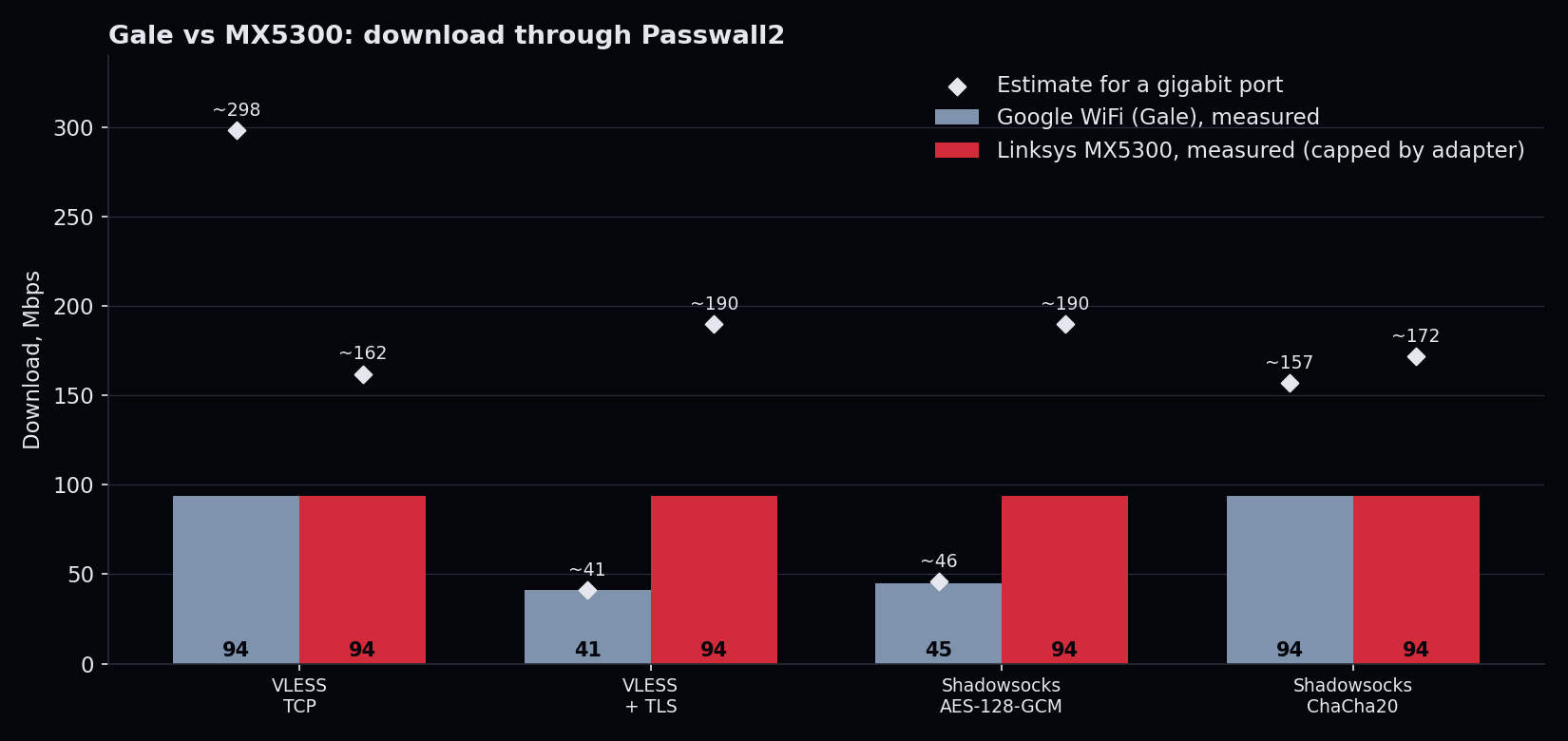
Bars are measured, diamonds are estimates. The MX5300 bars are a floor: the adapter ended the test, not the router.
7. What this says
On the Gale, encryption is the limit, not the radio and not the ports. With TLS or AES the CPU is at 93 to 96% and the speed stops at about 41 to 45 Mbps. Switch the cipher to ChaCha20 and the same router reaches the 94 Mbps my adapter allows, with CPU to spare on download. The Cortex-A7 has no AES instructions, so AES in software is slow, and ChaCha20 is built to be fast on exactly that kind of CPU.
The practical rule: on a Gale, if you want more than 40 Mbps through a proxy, choose ChaCha20 over AES, or drop TLS where the link does not need it.
The MX5300 shows the opposite picture. TLS and AES cost it almost nothing extra, its CPU sits around half-loaded at 94 Mbps, and the cipher you pick does not change the result. On the same test where the Gale falls to 41 Mbps, the MX5300 is at least 2.3 times faster and was still not working hard. Its Cortex-A53 cores report the ARM AES and SHA instructions (aes pmull sha1 sha2 in /proc/cpuinfo); the Gale’s Cortex-A7 is an older ARMv7 design without them.
Not tested: a plain routing baseline with Passwall off (it needs a second machine), WireGuard and OpenVPN.
8. Setup notes
Firmware. Both routers run the official OpenWrt 25.12.5 images from downloads.openwrt.org, not a vendor build or a third-party fork. Same OpenWrt release on both, and the same Passwall2 and Xray setup driving the test, so the router is the only variable I changed.
Flashing: follow the OpenWrt guides. I flashed both routers by the official OpenWrt installation steps for each device, and you should too. Do not copy a flashing recipe from a blog post, including this one; the right method depends on your exact model and revision, and a wrong step can brick the router. Each device has its own page in the OpenWrt Table of Hardware with the supported install methods:
- Google WiFi (Gale): restore with Google’s recovery mode if needed, then boot OpenWrt from a USB stick in Developer Mode and write it to the internal storage.
- Linksys MX5300: installing from the stock firmware (through the firmware update page or the web interface), or via TFTP or USB from U-Boot.
Read the whole page first, back up before you flash, and keep the recovery method ready.
After the first install: wrtforge. Once a router runs OpenWrt, wrtforge does the rest over SSH. It finds the official image for your exact board on downloads.openwrt.org and checks its sha256. It saves a verified backup first, with a recovery path, then flashes with sysupgrade. Then it installs Passwall2 and its dependencies from the official feeds, so nothing comes from a random mirror. One command, and --dry-run shows the plan without changing anything. Its first install on a device still follows the guide above; it is the upgrades and the Passwall2 setup it automates.
Passwall2. Runs on top of OpenWrt as a package. Its dependencies, Xray first, go in before the app; if a saved Passwall2 config starts with Xray missing, its half-loaded firewall rules cut the router’s own internet. wrtforge installs them in that order.
Benchmark tooling. The test is two small scripts in the same repo (bench/server.sh and bench/run.sh). wrtforge also has a quicker speed check in its menu, but it measures your connection, not the router’s ceiling, so I did not use it for these numbers. The router’s Passwall2 config is backed up before each run and restored after it, so a test never leaves a router in a test state.
What broke on the way, in case you repeat this:
- A 100 Mbps USB adapter. It capped every fast result at 94 Mbps. A gigabit adapter is the first thing to get.
- Private IPs skip the proxy. Passwall2 does not proxy 192.168.x.x addresses, so a test server on the LAN would have been bypassed. The client targets a made-up public address and the server redirects it to iperf3.
- Xray 26 dropped “allow insecure”. A self-signed certificate on the TLS test needs its SHA-256 pinned instead, or the connection fails with no useful error.
- A cipher option has a different name than you expect. In Passwall2 the Shadowsocks cipher is
ss_method; withmethod, Xray silently does not start. - Network order. With the laptop on Wi-Fi and a LAN cable at once, macOS sent the test traffic out over the wrong interface. Put the right one first in the service order.
- A cable test is fragile. An adapter that sleeps or renames itself (
en7became something else) ended a run. Check the link before you start a 10 minute matrix.
Comments are hosted by commentbox.io and only load when you ask for them.