tdsc-abus2023-pytorch is the data layer under my ABUS classification project. It’s a PyTorch Dataset for the TDSC-ABUS 2023 challenge [1]: 200 automated 3D breast ultrasound volumes, each with a tumor mask, a bounding box, and a malignant/benign label. It’s on PyPI, so getting from nothing to a training loop is one line:
pip install tdsc-abus2023-pytorch
This post is about why it exists, what it does, and what I had to fix to make it trustworthy, which turned out to be most of the work.
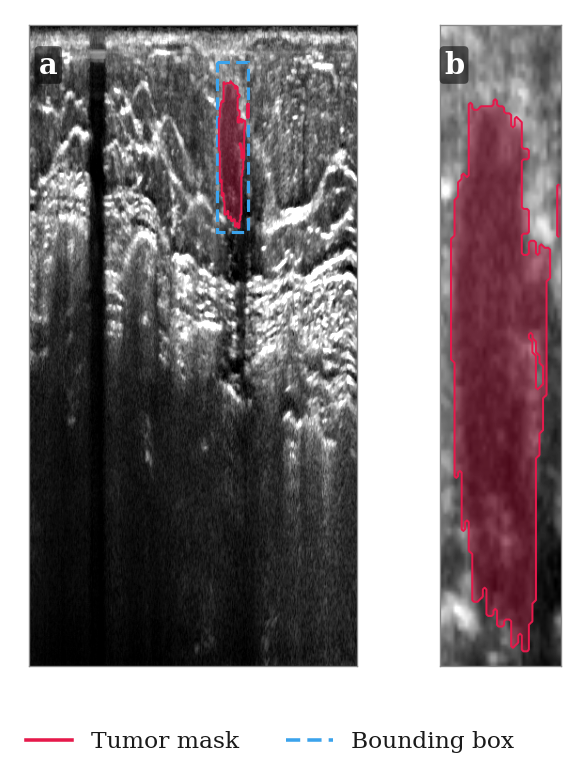
Case 8 (malignant). (a) Axial slice of the full volume from TDSC, with the tumor mask and bounding box. (b) The same tumor from TDSCTumors, cropped to its bounding box.
1. Why a package at all
The challenge data ships as .nrrd volumes plus two CSVs per split: labels.csv (case id, label, file paths) and bbx_labels.csv (bounding-box centre and size). Every project that uses it ends up writing the same glue: download the zips from Google Drive, unzip them, parse the CSVs, read the NRRD files, turn 'M'/'B' into integers, and convert centre-plus-size boxes into corner coordinates. I’d written that glue three times across experiments before I gave up and put it in a package.
The dataset itself is summarized below. Volumes are big, around 843×546×270 to 865×682×354 voxels, and the voxels aren’t cubes: about 0.2 × 0.073 mm in-plane and ~0.476 mm between slices.
| Split | Cases | Malignant | Benign |
|---|---|---|---|
| Train | 100 | 58 | 42 |
| Validation | 30 | 17 | 13 |
| Test | 70 | 40 | 30 |
2. What you get
Two dataset classes. TDSC gives you the full volume:
from tdsc_abus2023_pytorch import TDSC, DataSplits

dataset = TDSC(path="./data", split=DataSplits.TRAIN, download=True)
volume, mask, label, bbox = dataset[0]
label is 0 for malignant and 1 for benign, and bbox is ((x0, y0, z0), (x1, y1, z1)) in the volume’s native coordinates. With download=True, the split is fetched and extracted on first use. After that it stays on disk and nothing touches the network.
TDSCTumors returns the same thing already cropped to the tumor’s bounding box. For classification that’s usually what you want: the tumor is a small fraction of the volume, and there’s no reason to carry the rest of the breast through the pipeline.
from tdsc_abus2023_pytorch import TDSCTumors

dataset = TDSCTumors(path="./data", split="Train", download=True)
volume, mask, label = dataset[0]
Transforms are plain callables (volume, mask) -> (volume, mask), applied in order. The only one the package ships is ViewTransformer, which transposes the volume into the axial, coronal or sagittal plane. As Part 1 explains, the coronal plane is the one handheld ultrasound never captures and the one where spiculation shows up best, so switching views is a one-line change on purpose:
from tdsc_abus2023_pytorch import ViewTransformer, ViewTransposeConfig

dataset = TDSC(
    path="./data",
    split=DataSplits.TRAIN,
    transforms=[ViewTransformer(view=ViewTransposeConfig.CORONAL)],
)
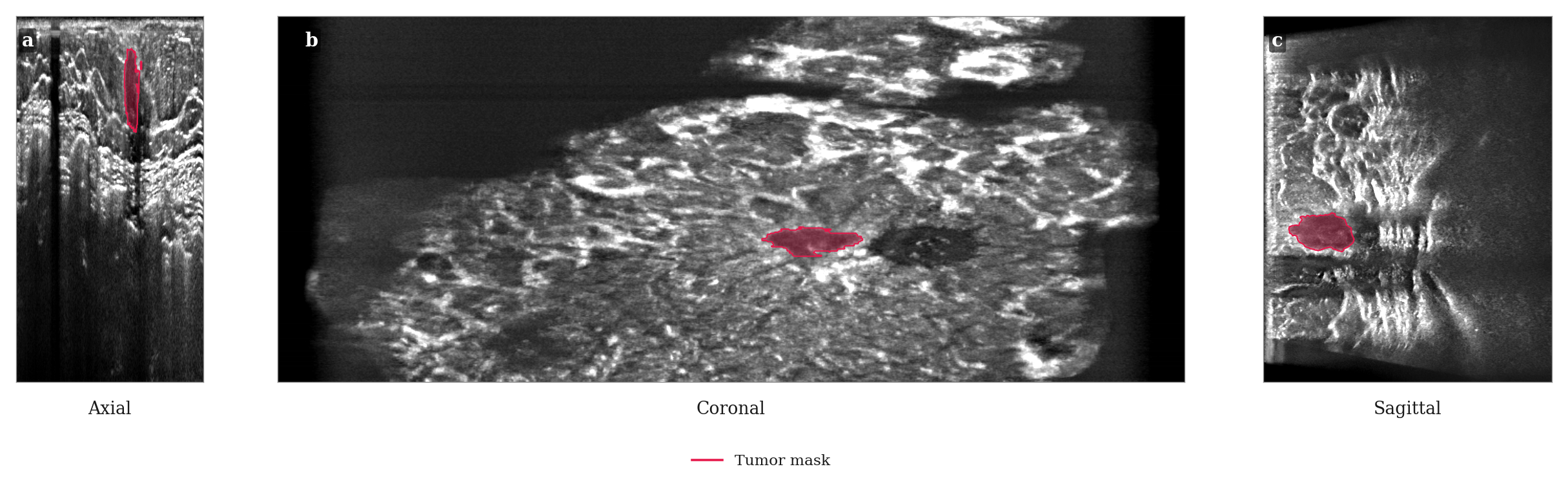
The same tumor through each view ViewTransformer produces: (a) axial, (b) coronal, (c) sagittal.
The dependency list is deliberately short: torch, numpy, pandas, pynrrd and gdown.
3. The bugs that were hiding in it
The first version, from March 2025, worked on my machine and for my experiments. When I went back through it properly this month, I found that “worked” was doing a lot of the lifting.
TDSCTumors transformed twice and cropped in the wrong place. It called the parent’s __getitem__, which already applied the transforms, then cropped using the bounding box, then applied the transforms again. The bounding box is defined in the original coordinate space, so with a ViewTransformer in the list the crop was taken from a transposed volume using untransposed coordinates. You got a region of the right size from the wrong part of the breast, and nothing crashed. That’s the worst kind of bug in a data pipeline: the model trains, the loss goes down, and the data is wrong. The fix was a _get_raw_item() that loads without transforms. TDSCTumors now crops first and transforms once, and there’s a regression test that fails if either ordering comes back.
It claimed Python 3.7 support and couldn’t import on it. The type hints used X | Y unions, which raise at import time before Python 3.10. A from __future__ import annotations fixed that, and the minimum is now an honest 3.9.
The download metadata was never actually packaged. The Google Drive file list was bundled with the package, but the code ignored it and fetched a copy from GitHub over HTTP. That relied on requests, which was never declared and was only installed because gdown pulls it in. Separately, MANIFEST.in pointed at a path with hyphens instead of underscores, so the bundled file wasn’t in the wheel either. Now it’s read with importlib.resources and ships with the package.
The tests downloaded several gigabytes every run. Every test used download=True with nothing mocked, and pytest.ini measured coverage of a module named tdsc that doesn’t exist, so the coverage report was measuring nothing. The suite now builds a tiny synthetic NRRD/CSV dataset in a fixture and runs offline in seconds.
None of these were hard to fix. They were just invisible until I stopped using the code and started reading it.
4. Making loading fast
Here’s the problem that bothered me most in practice. The volumes are gzip-compressed NRRD, so every dataset[i] decompresses roughly 200 MB, even in TDSCTumors, where you then throw away almost all of it to keep a crop a few centimetres across. Over many epochs with several DataLoader workers, that’s a lot of CPU spent unzipping the same bytes again and again.
The fix is an opt-in cache=True:
dataset = TDSCTumors(path="./data", split=DataSplits.TRAIN, cache=True)
loader = torch.utils.data.DataLoader(dataset, batch_size=1, num_workers=4)
On first access, each NRRD is decompressed once and saved as an uncompressed .npy next to it. Every later read opens that file with np.load(..., mmap_mode="r"). That has three effects:
TDSCskips decompression entirely.TDSCTumorsslices the memmap, so the OS only reads the pages under the tumor’s bounding box instead of the whole volume.- DataLoader workers share the OS page cache, so four workers don’t mean four private copies of the same volume in RAM.
It costs about 1.5× the NRRD’s disk space, which is why it’s off by default. The one subtle part is concurrency: several workers can hit the same uncached file at the same moment. Each worker writes to its own <name>.npy.<pid>.tmp and then os.replaces it into place. The rename is atomic, so no worker ever memory-maps a half-written file.
if not os.path.exists(npy_path):
    volume, _ = nrrd.read(full_path)
    tmp_path = f"{npy_path}.{os.getpid()}.tmp"
    with open(tmp_path, "wb") as f:
        np.save(f, volume)
    os.replace(tmp_path, npy_path)
return np.load(npy_path, mmap_mode="r")
TDSCTumors also copies its crop out of the memmap with np.array(...) right away, so the full volume’s mapping can be released as soon as the crop is taken, instead of living as long as the sample does.
5. Shipping it
The last piece was release plumbing. Publishing used to fail whenever a push to main reused a version number that was already on PyPI. CI now looks up the latest published version and bumps the patch number automatically, unless I’ve already bumped it by hand past that. The version lives in exactly one place, __version__, and setup.py reads it from there. Pushes to main go straight to stable PyPI, and other branches build but never publish.
6. What’s next
The package is intentionally boring: load the data correctly, load it fast, and get out of the way. The interesting work happens on top of it in the abus-classification series. The next posts there cover the classical radiology features we reproduce as a baseline, and then the deep-learning models, all of them reading their data through TDSCTumors.
If you’re working on TDSC-ABUS, pip install tdsc-abus2023-pytorch and please cite the challenge paper [1]. Issues and PRs are welcome on GitHub.
References
- G. Luo et al. Tumor Detection, Segmentation and Classification Challenge on Automated 3D Breast Ultrasound: The TDSC-ABUS Challenge. arXiv:2501.15588, 2025. arxiv.org/abs/2501.15588
Comments are hosted by commentbox.io and only load when you ask for them.