latex-academic-template started as the repo behind my own resume and turned into something more useful: a Dockerized LaTeX template gallery with a one-command scaffolding tool. No TeX Live install, no tlmgr, no losing an afternoon to a broken package manager. Getting from nothing to a compiling PDF is one command:
bash -c "$(curl -fsSL https://raw.githubusercontent.com/mralinp/latex-academic-template/main/create-latex-app.sh)"
This post is about why it exists, how the scaffolding wizard actually works, and two shell gotchas that only showed up once I stopped reading the script and started actually running it.
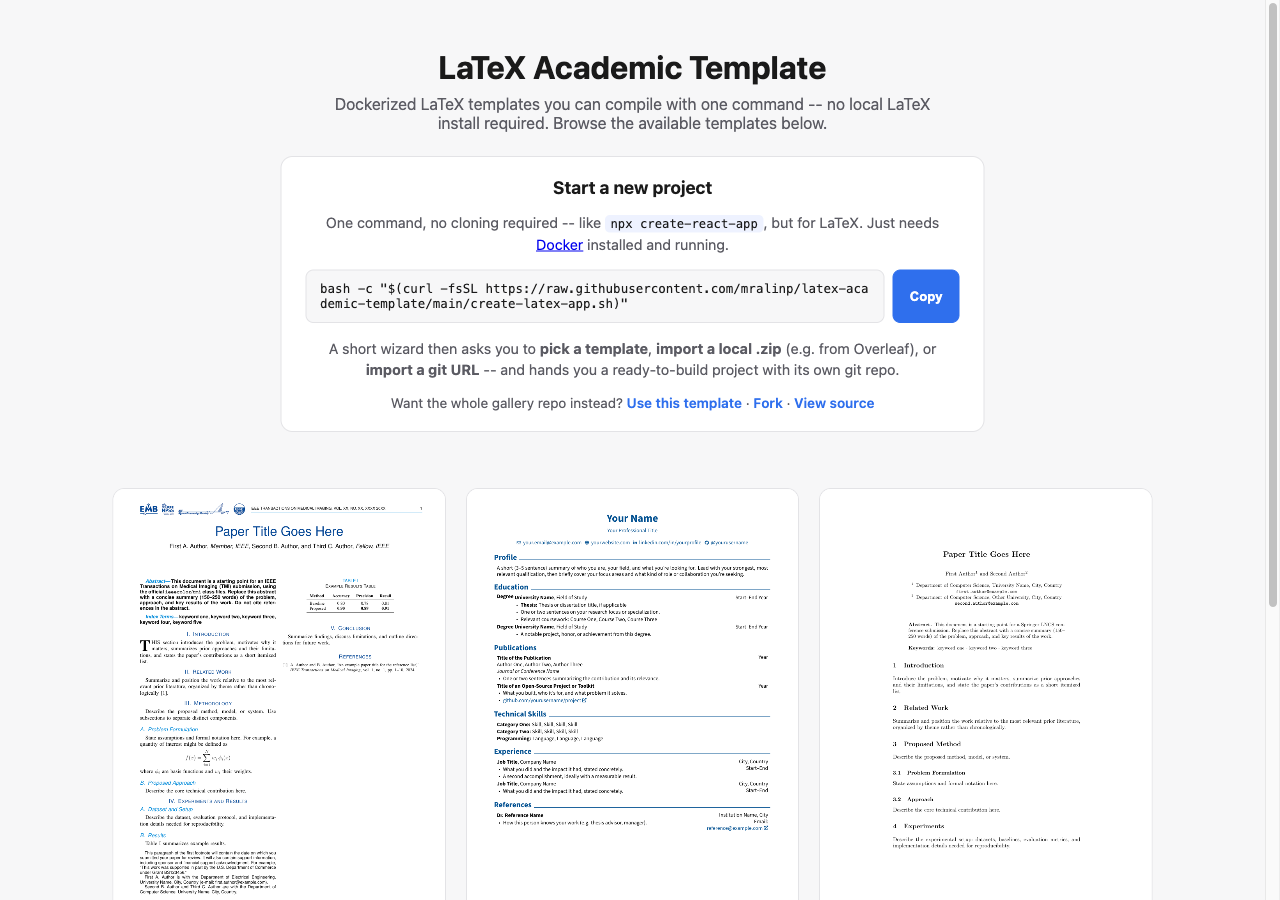
The live gallery: alinaderiparizi.com/latex-academic-template.
1. Why
Every LaTeX document I write starts the same way: clone some old project, delete the content, keep the \usepackage block, and hope the machine I’m on still has the right TeX Live scheme installed. A full scheme-full install is several gigabytes and drifts out of sync between my laptop, my desktop, and CI the moment any of them updates independently. None of that has anything to do with actually writing the document.
The fix is the same one I already use for everything else: don’t install the toolchain, run it in a container. docker-compose.yml pulls the official texlive/texlive image, and a Makefile on top of it does the rest. The only two things a clone of this repo needs on the host machine are Docker and make, both of which are already sitting on any machine I do real work on.
2. The gallery
The repo is a templates/ directory, one folder per document type, each with a main.tex and a small config.mk (engine, entry file, whether -shell-escape is needed). Three live there today:
- resume – a single-column CV with a contact-icon header built on
paracolandfontawesome5. - ieee-transactions – the actual IEEE Transactions on Medical Imaging author kit (
ieeecolor.cls+tmi.sty), vendored directly since it isn’t on CTAN. - springer-lncs – a Springer Lecture Notes in Computer Science proceedings skeleton.
Both the resume and the IEEE template used to be real content before I stripped them down. The IEEE one is a genericized version of the actual TMI draft for my spherical-harmonics ABUS work; the class files, the footnote block, the IEEEkeywords environment, all of it came straight out of a real submission. Turning a working document into a template is a good forcing function: anything left in the placeholder version is there because it’s structurally useful, not because I forgot to delete it.
Adding a template is meant to be trivial:
make add-template NAME=ieee-conference
scaffolds main.tex and config.mk, and from that point it’s picked up automatically by make list, make build-all, and the gallery page. No registry file to edit.
3. The create-react-app part
The gallery on its own still meant cloning (or forking, or “Use this template”-ing) the whole multi-template repo just to write one document – correct, but not what most people actually want. What they want is closer to npx create-react-app my-app: one command, a couple of prompts, a working project. So create-latex-app.sh exists to do exactly that:
bash -c "$(curl -fsSL https://raw.githubusercontent.com/mralinp/latex-academic-template/main/create-latex-app.sh)"
It’s a plain bash script (bash 3.2-compatible, since that’s what macOS still ships), and it asks three things: a project name, then one of
- a gallery template (resume, IEEE, Springer, …),
- a local
.zip, e.g. exported straight out of Overleaf, or - a git URL, e.g. an Overleaf project’s git remote,
and hands back a standalone folder with its own minimal Makefile, docker-compose.yml, and a fresh git repo with an initial commit, offering to run the first build immediately. For the .zip/git-import paths it also auto-detects the entry .tex file (first main.tex it finds, otherwise the first file with both \documentclass and \begin{document}) and, if the imported project already has its own Makefile or README, backs the originals up instead of silently overwriting them.
It also runs locally as make create for anyone already sitting inside a clone.
4. Two bugs that only existed at runtime
A source that hadn’t fully synced produced a fake success. Early on I tested the script against the just-pushed repo before the push had actually landed, so the temp clone it made was missing scaffold/Makefile. The cp failed, the sed failed, and the script kept going anyway and printed “Created my-project/” like nothing had happened – because nothing in it actually checked that the pieces it depended on were there. The fix was a verify_source() step, run right after the clone and before anything is written to disk, that fails loudly if the expected files aren’t present. Obvious in hindsight; invisible until I ran it against a source that was actually broken instead of one I’d manually pre-verified.
bash -c "$(curl ...)" arg1 arg2 doesn’t do what it looks like it does. The README’s documented one-liner works fine with no arguments. The moment I tried to pass flags through it the same way –
bash -c "$(curl -fsSL .../create-latex-app.sh)" my-cv --template resume
– it hung. Turns out bash -c command_string arg0 arg1 ... assigns the first trailing argument to $0, not $1. my-cv silently became the script’s $0 and vanished; the actual arguments the script saw were just --template resume, so the project name was never set, and it sat blocked on a read prompt that had no terminal left to answer it, since stdin had already been consumed by the command substitution. The fix isn’t in the script – it’s a documentation problem, the same one rustup and a few other curl-installers solve the same way: pass a throwaway placeholder for $0.
bash -c "$(curl -fsSL .../create-latex-app.sh)" _ my-cv --template resume
Neither of these would have surfaced from reading the script. They only showed up once I ran the exact commands I was telling people to run, against the actual published repo instead of a local copy.
5. What’s next
The Makefile is deliberately more than build: watch (latexmk -pvc), lint (chktex), wordcount (texcount), clean/clean-all, shell to drop into the container directly. CI builds every template on every push, and a GitHub Pages workflow renders a thumbnail of each one’s first page and republishes the gallery you see above – all inside the same container, so the preview is never out of sync with what make build actually produces.
The template list is intentionally short right now. IEEE Transactions and Springer LNCS were the two I actually needed; more will show up the same way those did, as real documents that get stripped down once they’re not needed as drafts anymore.
If you want a LaTeX document without installing LaTeX, bash -c "$(curl -fsSL https://raw.githubusercontent.com/mralinp/latex-academic-template/main/create-latex-app.sh)" and see what it gives you. Issues and template contributions are welcome on GitHub.
Comments are hosted by commentbox.io and only load when you ask for them.